Disclosure: ChartingLens is our product. It is listed here for the one job it does best, AI chart analysis, and the section on where it falls short is there so you can judge whether it fits how you trade. Every other price comes from that company's own pricing page, checked between November 6 and November 10, 2026.
Key takeaways
- TradingView is no longer "no AI". Its pricing page lists an AI Screener (preset prompts on the free plan, 100 requests on Essential up to 500 on Ultimate), and automatic chart patterns start on Premium at $69.95 a month.
- TrendSpider has no free plan. Standard lists at $54 a month billed annually or $89 month to month, and Advanced reaches $349 a month.
- NinjaTrader's Lifetime license is $1,499, and its Free plan trades live futures at a higher commission. "$1,099 lifetime, free for charts only" is out of date.
- ChartingLens Free includes automatic chart-pattern drawing, insider trades and 1 AI chart read a day; Premium is $14.99 a month.
The May version of this page quoted TrendSpider at $22 a month, NinjaTrader's lifetime license at $1,099, and said TradingView had no AI at any price. None of that matches the vendors' own pages in November 2026. So this version starts over: every price comes from the vendor's own page, dated, with the sources at the bottom.
There is no ranking below. An options trader at Schwab, a futures scalper and an investor who starts from the balance sheet need different tools, so each platform is listed for the one job it does best. If we were narrowing it down, these would be our top choices.
Best TradingView alternatives
TrendSpider
Best for automated technical analysis
- Automated trendline and chart pattern detection.
- Multi-timeframe analysis on one chart.
- Scanners, strategy testing and trading bots.
- A Sidekick AI assistant on every plan.
Website: trendspider.com
TrendSpider's pitch is that the software draws the lines for you. Trendlines, Fibonacci levels and chart patterns are detected automatically, several timeframes fold onto one chart, and scanners and bots run on the same rules. For a technician who spends an hour a night redrawing trendlines, that is the whole sale. US stock and ETF data is included for non-professional users, real-time futures data is $7.50 a month and OPRA options data $9.50, and every plan includes 25 Sidekick AI messages a month.
Read the limits before you pay. Alerts run 10, 50, 100 and 400 by plan and expire after 30, 90, 180 and 365 days. Standard backtests and scans on 2-hour bars at the shortest, Premium on 5-minute bars, and only Enhanced and Advanced go down to 1 minute. With no free tier, you are paying from day eight.
Cheaper options are in TrendSpider alternatives, and the math is in is TrendSpider worth it.
thinkorswim
Best for options traders
- Options analytics with risk profiles and probability analysis.
- Hundreds of studies plus custom thinkScript.
- paperMoney practice trading and OnDemand market replay.
- Stocks, options, futures, forex and spot bitcoin and ether on one account.
Website: schwab.com/trading/thinkorswim
thinkorswim is still the benchmark for options charting: risk profiles, probability-of-profit numbers and an options chain wired straight into the chart, on desktop, web and mobile, with trading off the chart. Schwab Crypto now puts spot bitcoin and ether on the platform at 0.75% of trade value with no added spread, though not in New York or Louisiana and without SIPC protection. Forex covers 65+ pairs. For a Schwab customer it is the most platform you can get without a subscription.
It is a lot of software. The desktop app is dense, the learning curve is real, and you can't log in without the brokerage account, so the layouts and studies you build stay behind if you move your money.
Elsewhere? thinkorswim alternatives.
ChartingLens
Best for AI chart analysis
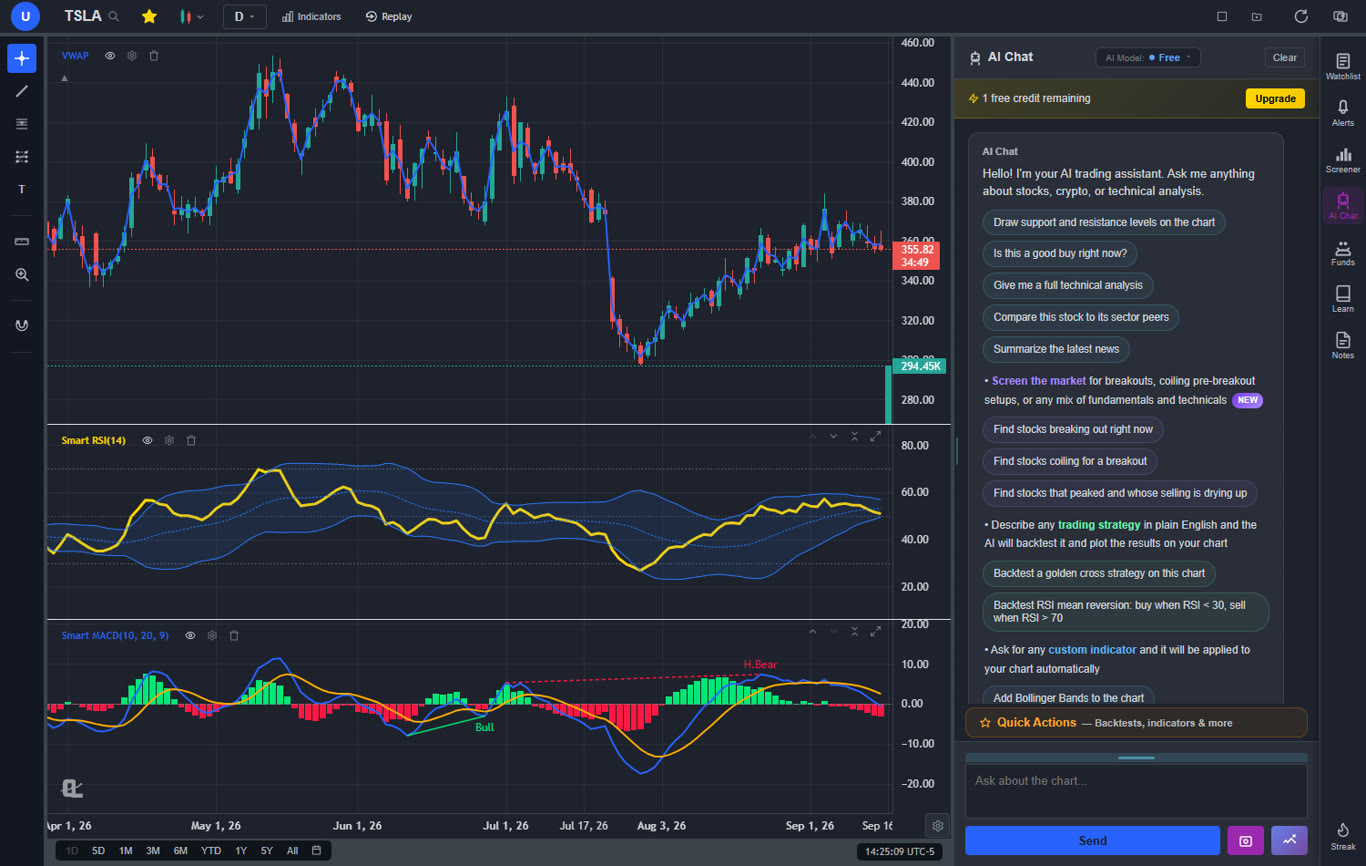
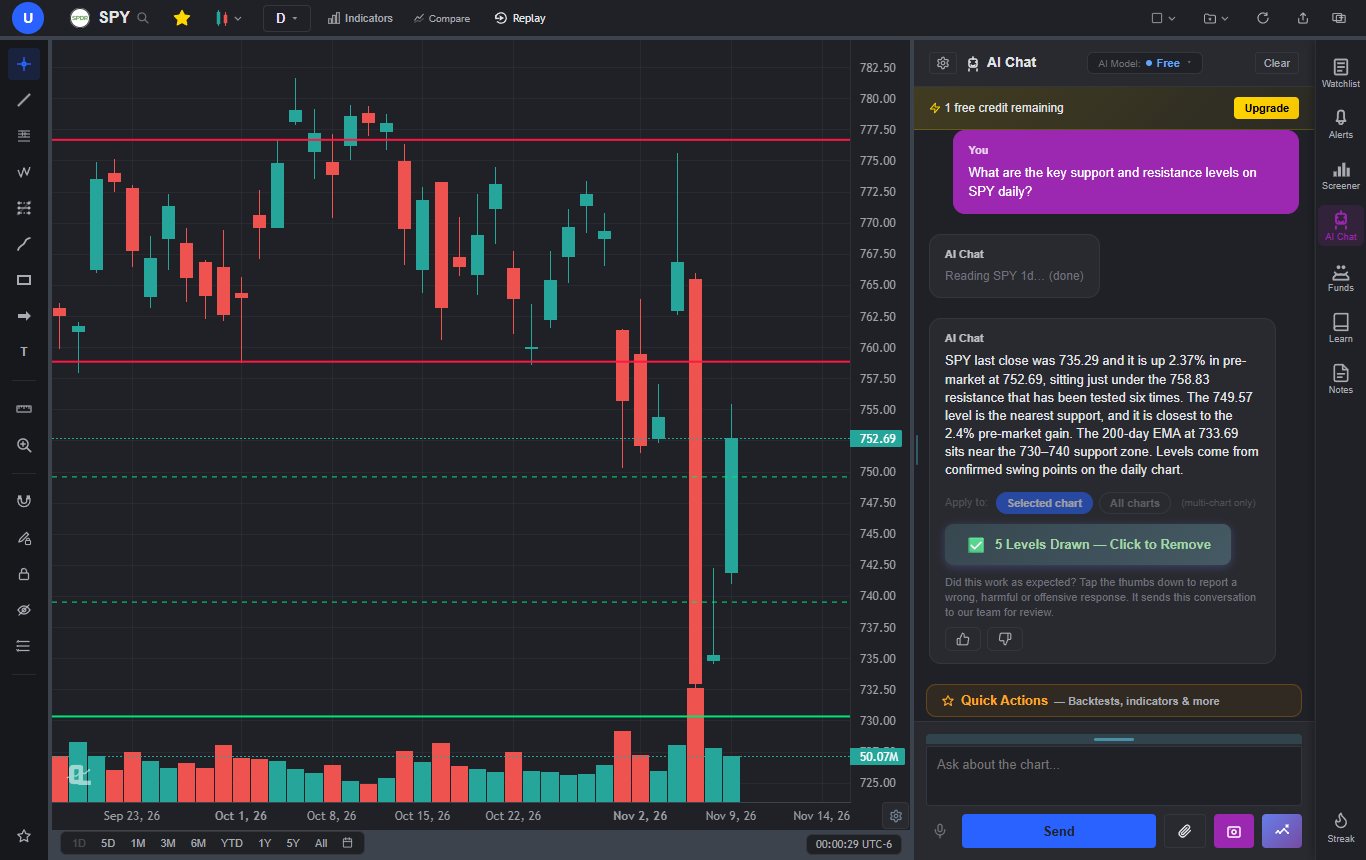
- An AI assistant that reads the chart you are on, marks the levels and gives a verdict with an entry, a stop and a target.
- Chart patterns, support and resistance zones and Fibonacci zones drawn automatically, most of it on the free plan.
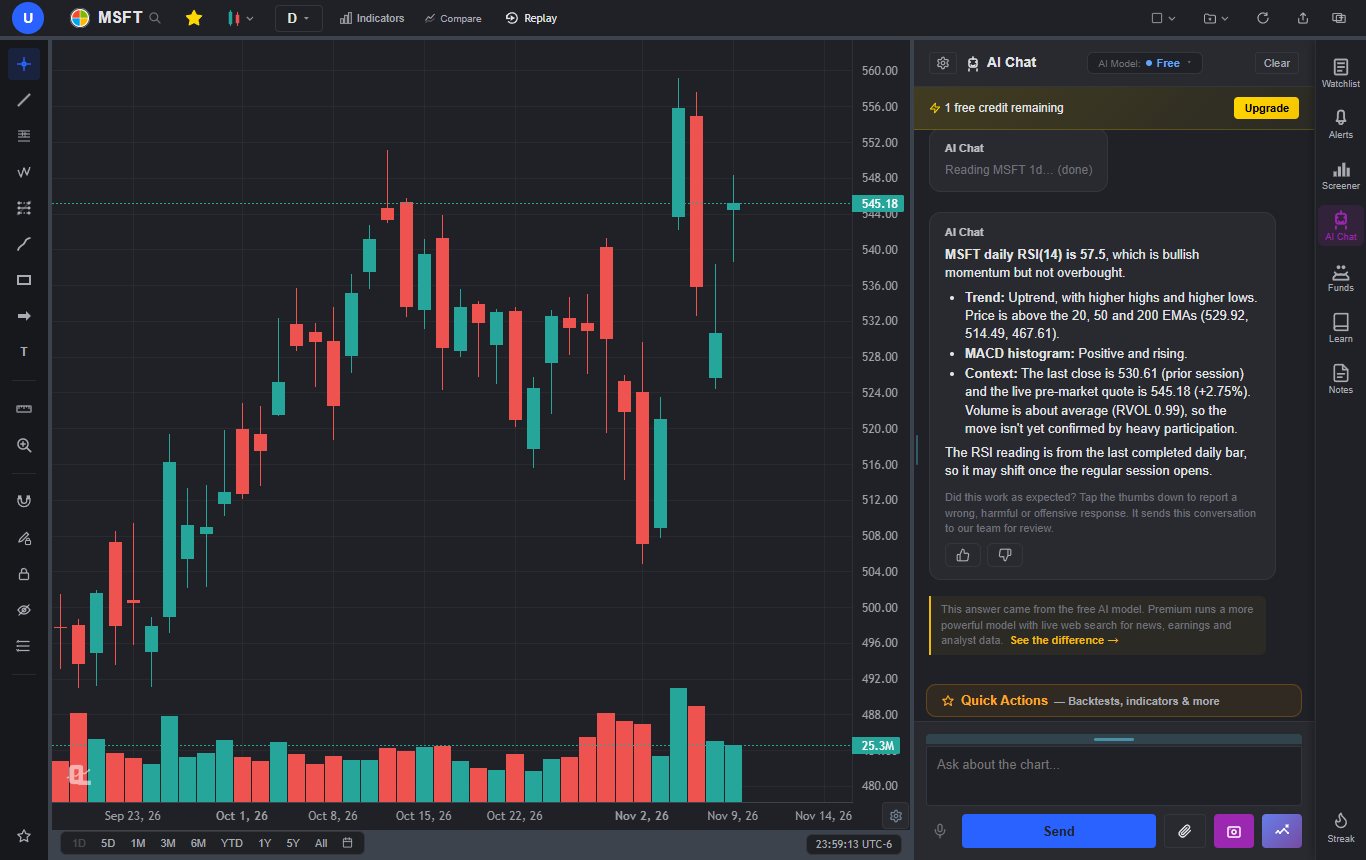
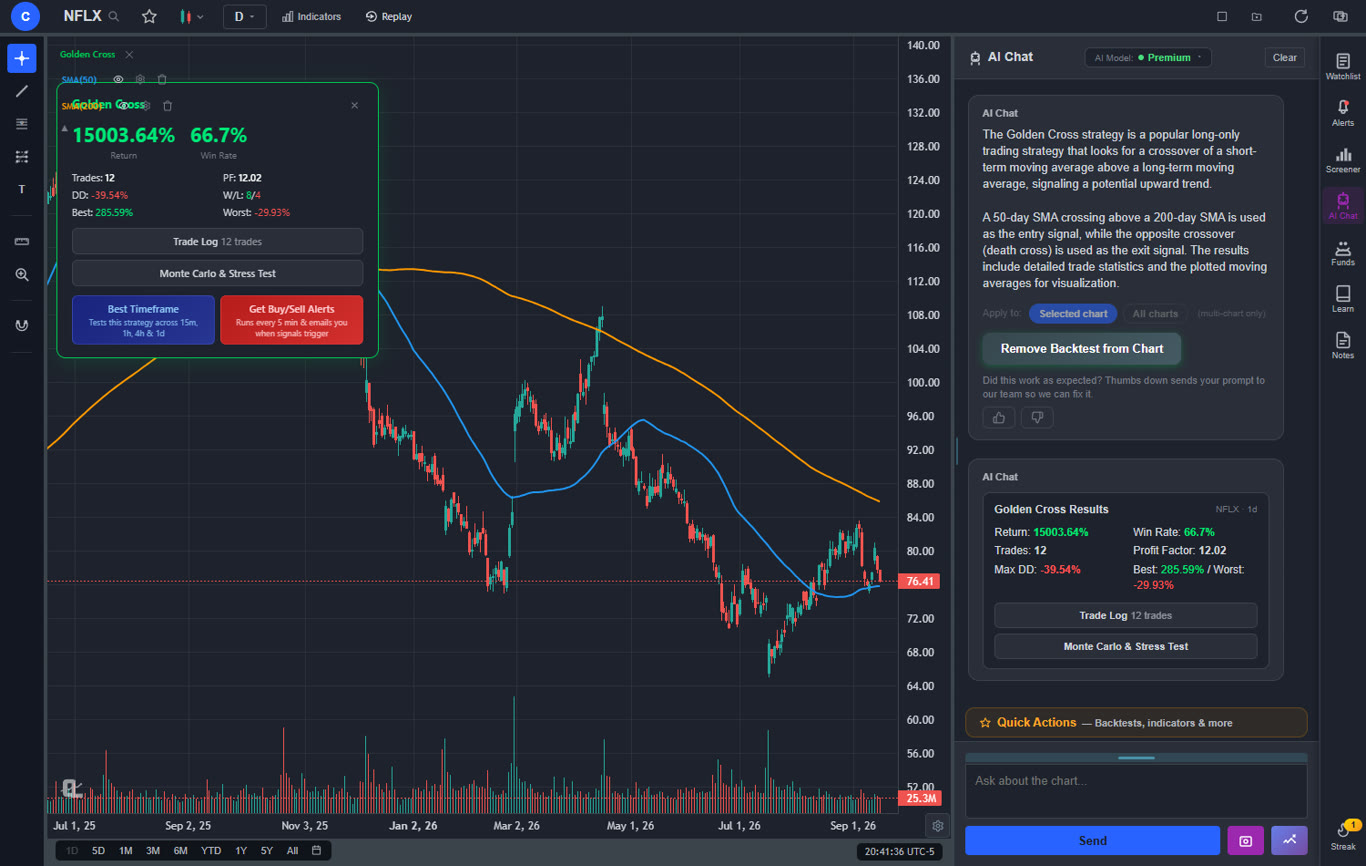
- Strategies written in plain English, backtested with intrabar exits and a Monte Carlo stress test.
- Insider trades, 13F holdings and congressional trades beside the chart.
Website: chartinglens.com
ChartingLens is a well-established platform with a large active user base, advanced features, and an institutional-grade strategy builder and backtesting engine. Its job on this list is the analysis around the chart. Ask the AI assistant about the chart in front of you and it reads the price data, draws the levels and gives you a plan; ask it to add indicators, build a strategy or set an alert and it does that on the chart. It runs in the browser and as iPhone and Android apps on one account, and US stocks and ETFs stream live during the regular session on every plan.
We tested that assistant in November 2026: 23 questions on the Free and Premium models, 46 answers, with every price, indicator value and level checked against the chart data and an outside quote feed. All 46 held up, and 200 of 200 closing prices matched. The method and its limits are in the reliability report.
For anyone leaving TradingView, two more things matter. Pine Script indicators and thinkorswim studies can be pasted in and converted to native indicators on Premium. And Master Chart Patterns, Master S/R Zones and Smart Fib Zones draw what you used to draw by hand. Insider buys and sells from SEC Form 4 filings are on every plan; the 13F holdings of 20 funds and congressional trade disclosures are on Premium.
Head to head: ChartingLens vs TradingView.
NinjaTrader
Best for futures day trading
- Depth of market (DOM) ladder and order flow tools.
- ATM strategies that manage stops and targets for you.
- NinjaScript (C#) for custom indicators and automated strategies.
- Free simulated trading on every plan.
Website: ninjatrader.com
NinjaTrader is a futures platform and broker in one, built around the DOM, order flow and fast execution. Its plans price the commissions, not the software. The Free plan has no monthly fee and charges $0.39 per side on Micro contracts and $1.29 on Standard. Monthly is $99 a month at $0.29 and $0.99, and Lifetime is a one-time $1,499 at $0.09 and $0.59, with Order Flow+ included. Exchange, clearing and NFA fees come on top, and the plan benefits need a funded NinjaTrader brokerage account.
Day-trading margins are $50 on Micro contracts, which is a big part of the draw. The desktop platform runs on Windows, and NinjaScript is C#, so building your own tools takes real programming.
Other futures platforms: NinjaTrader alternatives.
Koyfin
Best for fundamental research
- Financial dashboards you build yourself.
- Fundamentals, valuation history and analyst estimates.
- Macro and economic data next to the market.
- A stock and ETF screener on the paid plans.
Website: koyfin.com
Koyfin is a research terminal for people who start from the numbers rather than the candles. The free plan includes advanced charting, market and macro dashboards, 2 watchlists, 2 screens, 2 custom dashboards and 2 years of financials with 1 year of estimates. Plus opens 10 years of both, ETF holdings, the stock and ETF screener, unlimited watchlists and dashboards, and filings and transcripts. Premium adds portfolio analytics and custom formulas.
It is not a trading chart. Intraday work, drawing tools and pattern analysis are thin, so most active traders pair it with a charting platform instead of replacing TradingView with it.
Rivals are in Koyfin alternatives.
How do the best TradingView alternatives compare?
The columns that decide most switches, from each vendor's own pages between November 6 and 10, 2026, with TradingView as the reference row:
| Platform | Best for | Markets | Real-time data | Scripting | Free plan | Starting price |
|---|---|---|---|---|---|---|
| TradingView (for reference) | All-around charting | Stocks, ETFs, futures, crypto, forex, bonds | Exchange data subscriptions, capped per plan | Pine Script | Yes, 2 indicators per chart | $12.95/mo billed annually |
| TrendSpider | Automated technical analysis | Stocks, ETFs, crypto, forex; futures and options data as add-ons | Included for US stocks (non-professional) | Its own code editor | No (7-day trial) | $54/mo billed annually |
| thinkorswim | Options traders | Stocks, ETFs, options, futures, forex, spot BTC and ETH | Yes, with the account | thinkScript | Free with Schwab | Free |
| ChartingLens | AI chart analysis | US and international stocks, ETFs, crypto, forex, metals, index and commodity CFDs | US stocks live in the regular session on every plan | Pine Script and thinkScript conversion, plain-English AI indicators (Premium) | Yes, 3 indicators per chart | $14.99/mo |
| NinjaTrader | Futures day trading | Futures | Through the NinjaTrader brokerage | NinjaScript (C#) | Yes, at a higher commission | $99/mo or $1,499 lifetime |
| Koyfin | Fundamental research | Global stocks, ETFs, macro data | Not the focus | None | Yes, 2 years of financials | $39/mo billed annually |
Other TradingView alternatives worth considering
| Platform | Best use | Free option | Paid from |
|---|---|---|---|
| GoCharting | Order flow in a browser | Yes, real-time US stocks (Cboe), crypto, FX and CFDs | CME bundle $30/mo billed yearly ($35 monthly) |
| MetaTrader 5 | Forex, CFDs and automated trading | Free from your broker | Depends on the broker |
| StockCharts | Traditional technical analysis | Yes, 3 indicators and 3 overlays per chart | Basic $19.95/mo |
| Finviz | Stock screening and heatmaps | Yes, delayed | Elite $39.50/mo or $299.50/yr |
| TC2000 | Advanced stock scanning | No | Basic $24.99/mo ($20.82 billed annually) |
| Webull | Free charts inside a brokerage app | Yes, with an account | Level 2 $2.99/mo |
GoCharting is the browser answer to order flow. Its free USA plan already has real-time Cboe stock data, full-depth crypto, bar replay and 100+ indicators with no per-chart cap, but footprint and imbalance charts, delta and order-flow indicators, indicator alerts and its Lipi scripting sit in the paid CME bundle, whatever the pricing headline suggests. MetaTrader 5 is free from most forex and CFD brokers and comes with MQL5 for expert advisors, which is why it keeps coming up for forex and trading bots. StockCharts is the classic technical analysis option, with SharpCharts, point-and-figure and ChartSchool; its free level allows 3 indicators and 3 overlays per chart, and ChartLists and price alerts start on Basic (StockCharts alternatives). Finviz is a screener with charts attached, and Elite adds real-time data including pre-market and after-hours (is Finviz Elite worth it). TC2000 puts scanning and charts in one window, but its cheapest plan is now Basic at $24.99, and drawing tools and real-time scanning start on Premium at $49.99. Webull gives you decent free charts in the app that places your orders, with Nasdaq TotalView Level 2 at $2.99 a month.
Our recommendation
If you are leaving TradingView and starting from scratch, we would shortlist:
- TrendSpider: best if you want the software to find the trendlines and patterns.
- thinkorswim: best for options, if you already bank with Schwab.
- ChartingLens: best for AI chart analysis, with smart-money data on the same chart.
- NinjaTrader: best for futures day trading.
- Koyfin: best for fundamental research and longer-term investing.
Put your own tickers on two of them for a week before you cancel anything. The one you keep opening is the answer.
What do you give up by leaving TradingView?
More than most alternatives lists admit. TradingView's pricing page lists 400+ built-in indicators and 150K+ community indicators, its chart engine is the one everyone else gets compared against, and it covers stocks, futures, forex, crypto and bonds on one login. If your method depends on a particular Pine Script, staying may be the right call.
What you pay for it went up in April 2026. Essential is $14.95 a month ($12.95 billed annually), Plus $34.95 ($29.95), Premium $69.95 ($59.95) and Ultimate $239.95 ($199.95). The free Basic plan allows 1 chart per tab, 2 indicators per chart and 3 price alerts. Real-time exchange data is a separate subscription, and each plan caps how many you can hold: 2 on Essential, 4 on Plus, 6 on Premium and unlimited on Ultimate.
Two things older lists get wrong. TradingView does have AI now: an AI Screener with preset prompts on the free plan and 100, 150, 250 or 500 requests on the paid plans. And it draws chart patterns automatically, but only from Premium up. What its pricing page still doesn't list is an assistant that reads your chart and acts on it. Since November 1, 2026, paid invite-only scripts can only be sold through TradingView's own Marketplace. The full breakdown is in the TradingView price increase and is TradingView worth it.
What is the best free TradingView alternative?
thinkorswim and ChartingLens Free give away the most, and GoCharting's free plan goes furthest for traders who want real-time data without footprint charts. Here is where each free plan stops, from the vendors' pages:
| Platform | Free plan includes | Main limit |
|---|---|---|
| ChartingLens | Every market, live US charts, pattern drawing, screener, insider trades, 1 AI chart read a day | 3 indicators per chart; free price alerts fire only while the app is open |
| thinkorswim | The full platform, including paperMoney | Needs a Schwab account |
| GoCharting | Real-time US stocks (Cboe), crypto, FX, bar replay, 100+ indicators | Footprint, order flow tools and indicator alerts are paid |
| NinjaTrader | Charts, simulated trading and live futures trading | The highest commission tier ($0.39 per side on Micros) |
| Koyfin | Advanced charting, dashboards | 2 watchlists, 2 screens, 2 years of financials |
| TradingView (for reference) | Charts, community scripts, screeners | 1 chart per tab, 2 indicators per chart, 3 price alerts |
| TrendSpider | No free plan | 7-day trial |
Only the free plans, compared in more depth: the best free stock charting software.
Which TradingView alternative has AI chart analysis?
ChartingLens and TrendSpider, in different ways. The ChartingLens AI assistant reads the price data of the chart you are on, names the trend and the levels, draws them, and answers with a verdict, an entry, a stop and a target. It can also add indicators, build and backtest a strategy or set an alert from one sentence. Free gets 1 AI credit a day, Premium 20 and Pro unlimited. TrendSpider's AI works through its automated pattern detection, plus 25 Sidekick AI messages a month on every plan. TradingView's AI is its screener, with a request cap per plan.
For automatic pattern drawing, TrendSpider built its product around it, ChartingLens draws chart patterns, Elliott waves, harmonic patterns and support and resistance zones mostly on the free plan, and TradingView does it from Premium. More on the AI side in TradingView alternatives with AI.
Can you use Pine Script outside TradingView?
Not natively anywhere else, but you can bring indicators across. ChartingLens converts a pasted Pine Script indicator, or a thinkorswim thinkScript study, into a native indicator with its inputs and colors on Premium, and it can also build an indicator from a plain-English description. TrendSpider has its own code editor, thinkorswim uses thinkScript and NinjaTrader uses NinjaScript, so a Pine script has to be rewritten by hand on each. Check your key scripts before you leave: invite-only and closed-source scripts don't show their code, so they can't come with you at all. The switch itself is covered step by step in how to migrate from TradingView.
What is the best TradingView alternative for options and futures?
thinkorswim for options and NinjaTrader for futures. thinkorswim's options analytics are free with a Schwab account, and it charts and trades futures too. NinjaTrader is built for futures execution, with a free plan and $99 a month or $1,499 lifetime licenses that lower the commission per contract. TrendSpider sells real-time futures data for $7.50 a month and OPRA options data for $9.50. ChartingLens does not chart futures contracts or options chains; it covers index and commodity CFDs that track the same underlyings, which is enough to study a setup but not to trade the contract.
What is the best TradingView alternative for forex and crypto?
For forex, MetaTrader 5 from your broker is the usual answer, especially if you want to automate with MQL5, and thinkorswim covers 65+ pairs commission-free for Schwab clients. For crypto, GoCharting's free plan streams full-depth crypto data, and thinkorswim now trades spot bitcoin and ether. ChartingLens charts forex, metals and crypto alongside stocks on every plan, and its AI reads them the same way, which suits traders who move between markets more than traders who need a broker attached.
Where ChartingLens falls short
- No futures contracts or options chains. Index and commodity CFDs only.
- No public script library. Pine Script and thinkScript come in by paste-and-convert on Premium.
- No trading. It is broker-agnostic, which also means orders go through your broker.
- Free plan caps. 3 indicators per chart, 1 AI credit a day, and free price alerts only fire while the app is open.
- A 20-alert cap on Premium. Unlimited alerts are on Pro.
- Not a fundamentals terminal. For 10 years of financials and estimates, Koyfin goes deeper.
Pricing at a glance
| Platform | Free plan | Paid plans |
|---|---|---|
| TradingView (for reference) | Yes | $14.95 to $239.95 a month, or $12.95 to $199.95 billed annually |
| TrendSpider | No | $89 to $349 a month, or $54 to $214 billed annually |
| thinkorswim | Free with Schwab | None |
| ChartingLens | Yes | $14.99 or $29.99 a month; $149 or $299 a year |
| NinjaTrader | Yes | Monthly $99, Lifetime $1,499 one-time |
| Koyfin | Yes | Plus $39, Premium $79 a month billed annually |
| GoCharting | Yes | CME bundle $30 a month billed yearly ($35 monthly) |
| StockCharts | Yes | $19.95, $29.95 or $49.95 a month |
| Finviz Elite | Yes, delayed | $39.50 a month or $299.50 a year |
| TC2000 | No | $24.99 to $99.99 a month, $20.82 to $83.32 billed annually |
How we checked
We read every competitor price and plan limit from that company's own pricing page. TradingView, Koyfin and NinjaTrader were checked on November 10, 2026; TrendSpider, StockCharts, TC2000, GoCharting and Schwab on November 7; Finviz and Webull on November 6. TradingView's AI Screener, chart pattern and volume profile rows were read from the plan grid's checkmarks, because its plain feature list names every feature under every plan. TrendSpider's figures are its regular list prices; its Black Friday sale lowers the first year. Koyfin's prices are the ones its page shows with annual billing. Nothing here is estimated. If we could not confirm it from the vendor, it is not on the page.
Sources
How ChartingLens fits your workflow
Because ChartingLens doesn't place trades, it sits next to whatever broker you already use, with no platform lock-in. It is battle-tested at scale by a large trader community, from day traders to long-term investors, and a lot of what ships starts as their feedback. The large built-in indicator library, comprehensive multi-asset market coverage and a mature AI-first feature ecosystem live in one place, and the institutional-grade strategy builder takes entry and exit rules, regime filters and stops in plain English before handing them to the backtesting engine. More on testing ideas that way in the best backtesting software.
The extensive documentation and learning resources keep the switch short: free Learn courses teach on real charts, switching from TradingView covers what to move first, and how to use ChartingLens walks through every panel.
Related Articles
10 Best TradingView Alternatives in 2026 (Free & Paid)
A wider lineup of ten platforms.
Read article → ReviewTradingView Review & Top Alternatives in 2026
What TradingView still does best, and where it doesn't.
Read article → Alternatives10 Best Barchart Alternatives in 2026 (Free & Paid)
The same question for Barchart users.
Read article →Try the Charting Platform That Reads the Chart With You
Live charts, an AI chart read, pattern drawing, a screener and smart-money data. Free to start, works with any broker.
Start Charting Free →