10 Best ProRealTime Alternatives in 2026 (Free & Paid)
By ChartingLens TeamUpdated May 8, 202624 min read
📅 May 2026 Update
ChartingLens just launched a new tier structure — Premium at $14.99/mo with sensible quotas (20 alerts, 10 layouts, 20 AI credits/day) and Pro at $29.99/mo with unlimited everything. The Free tier is unchanged: real-time stocks, crypto, forex & metals, all chart types, all drawing tools, cloud sync, and insider data. Yearly plans save 17%. Compare all plans →
ProRealTime alternatives are charting and trading platforms that offer similar or superior technical analysis, backtesting, and market data capabilities without ProRealTime's per-exchange real-time data fees or desktop-centric limitations. Traders seek alternatives due to ProRealTime's paid real-time data model, lack of AI features, smaller scripting community compared to Pine Script or MQL, and an interface that has not kept pace with modern web-based platforms.
The 10 best ProRealTime alternatives in 2026, ranked:
ChartingLens — Free tier with a large indicator library, AI buy/sell signals, AI assistant, auto pattern recognition, insider data, plain-English backtesting. Premium $14.99/mo.
TradingView — Web-based multi-asset charting with Pine Script, massive community, and 400+ indicators. Free tier limited; paid plans $14.95-$59.95/mo.
Thinkorswim — Free desktop platform with thinkScript, deep options analytics, and integrated Schwab execution. Free with brokerage account.
MetaTrader 5 — MQL5 scripting with Expert Advisors for automated forex and CFD trading. Free through brokers.
cTrader — Modern ECN forex platform with C#-based cTrader Automate and Level II pricing. Free through brokers.
NinjaTrader — Advanced futures platform with order flow tools, volumetric bars, and NinjaScript (C#). Free sim; $1,099 lifetime license.
TradeStation — EasyLanguage strategy automation with deep backtesting and integrated broker execution. $0-$99/mo.
Sierra Chart — Ultra-fast C++ charting with advanced order flow, footprint charts, and deep market depth. $15.60-$36/mo.
Barchart — Broad free market data across stocks, futures, forex, and options with 150+ indicators. Premium $19.99-$59.97/mo.
Why Traders Are Leaving ProRealTime
ProRealTime has carved out a solid reputation among European traders as a serious charting and automated trading platform. Its ProBuilder scripting language, advanced charting tools, and direct broker integration through Interactive Brokers and IG made it a go-to choice for traders who wanted sophisticated analysis without switching to a full institutional terminal. For years, the combination of ProBacktest for strategy testing and clean chart rendering kept a loyal user base, particularly in France, the UK, and Germany.
But in 2026, the trading technology landscape has shifted dramatically, and ProRealTime is showing its age. The platform's pricing model — free with end-of-day data, paid for real-time starting around €12.50 to €30+ per month depending on the data feed and exchange — immediately puts it at a disadvantage against modern platforms that offer real-time data on generous free tiers. The desktop-heavy experience feels increasingly out of step with traders who expect to analyze markets from any browser or device. And while ProRealTime's web version exists, it lacks the full capability of the desktop application, creating a two-tier experience that frustrates users.
Perhaps most critically, ProRealTime has zero AI features at any tier. No AI buy/sell signals, no AI trading assistant, no automated chart pattern recognition, and no plain-English strategy building. In a year where AI is transforming how traders analyze charts and build strategies, ProRealTime still requires you to learn ProBuilder and write every indicator and strategy from scratch. The ProBuilder community, while knowledgeable, is substantially smaller than the Pine Script or MQL ecosystems, meaning fewer shared strategies, fewer tutorials, and a steeper self-learning curve.
This guide reviews 10 platforms that serve as genuine ProRealTime alternatives in 2026. Whether you are frustrated by real-time data fees, want AI-powered analysis, or simply need a more modern web-based experience, you will find the right fit here. If you are also evaluating other platforms, check our guides to the best TradingView alternatives, MetaTrader alternatives, and TradeStation alternatives.
The ProRealTime Problem in 2026
Before diving into alternatives, it is worth understanding exactly where ProRealTime falls short for modern traders. These are the pain points driving the migration away from the platform:
Real-time data requires paid subscriptions (€12.50-€30+/month per exchange). The free tier only provides end-of-day data, which is useless for day traders and swing traders who need intraday charts. Each exchange requires a separate data subscription, and costs add up quickly if you follow multiple markets.
Desktop-focused — web version exists but is less capable. The full ProRealTime experience requires the desktop application. The web version lacks several features available on desktop, creating a frustrating gap for traders who want full capability from a browser.
No AI features at any tier (no AI signals, no assistant, no pattern recognition). In 2026, this is a critical gap. Platforms like ChartingLens offer AI buy/sell signals, an AI trading assistant, and auto chart pattern recognition on their free tiers. ProRealTime offers none of these at any price.
ProBuilder scripting has a smaller community than Pine Script or MQL. While ProBuilder is a capable language, the community of developers sharing strategies, indicators, and tutorials is a fraction of what TradingView's Pine Script or MetaTrader's MQL ecosystems offer. Finding help or pre-built strategies is harder.
Limited to stocks covered by partner brokers (IG, Interactive Brokers). ProRealTime's market coverage depends on which brokers you connect. Without a brokerage relationship, data access is restricted to end-of-day snapshots and limited instruments.
No insider trading data or hedge fund holdings. ProRealTime focuses purely on technical charting and price data. There is no way to track institutional holdings, insider transactions, or hedge fund holdings moves from within the platform.
No plain-English backtesting — requires ProBuilder coding. Every backtest in ProRealTime requires writing ProBuilder code. There is no visual strategy builder or natural language interface. Traders who are not programmers face a steep barrier to testing their ideas.
Smaller user community means fewer shared indicators and strategies. Compared to TradingView's millions of users sharing Pine Scripts or MetaTrader's massive MQL5 marketplace, ProRealTime's library of community-contributed content is limited.
Interface feels dated compared to modern web-based platforms. While functional and data-rich, the visual design of ProRealTime has not kept pace with the clean, modern aesthetics of platforms built in the last few years.
Quick Comparison: All 10 ProRealTime Alternatives
Here is how all 10 platforms compare across the features that matter most when replacing ProRealTime.
Scroll horizontally to see all columns →
Platform
Free Tier
AI Features
Backtesting
European Markets
Web-Based
Premium Cost
ChartingLens
✓ Full features
✓ AI signals, assistant, patterns
✓ Plain-English AI
✗ US stocks only
✓ Fully web-based
$14.99/mo
TradingView
Limited (1 indicator)
✗
✓ Pine Script
✓ Broad coverage
✓
$14.95–$59.95/mo
Thinkorswim
✓ With Schwab
✗
✓ thinkScript
Limited
Desktop-first
Free with account
MetaTrader 5
✓ Through broker
✗
✓ MQL5
✓ Via broker
Desktop + web
Free through brokers
cTrader
✓ Through broker
✗
✓ cTrader Automate
Via broker
✓ Web + desktop
Free through brokers
NinjaTrader
✓ Sim trading
✗
✓ NinjaScript
✗ US futures focus
✗ Desktop only
$0–$1,099 lifetime
TradeStation
With trading volume
✗
✓ EasyLanguage
✗ US-focused
Desktop + web
$0–$99/mo
TrendSpider
✗
✓ Auto trendlines
✓ Point-and-click
Limited
✓
$22–$79/mo
Sierra Chart
✗
✗
✓ ACSIL (C++)
Via data feed
✗ Desktop only
$15.60–$36/mo
Barchart
✓
✗
✗
Some coverage
✓
$19.99–$59.97/mo
In-Depth Reviews of All 10 ProRealTime Alternatives
1. ChartingLens — Best Overall ProRealTime Alternative
ChartingLensFree + $14.99/mo Premium
ChartingLens is the strongest overall ProRealTime replacement in 2026, particularly for traders who want modern AI-powered analysis without paying per-exchange data fees or spending weeks learning ProBuilder. Where ProRealTime requires a desktop application and scripting expertise before you can build anything meaningful, ChartingLens runs entirely in your browser with zero installation and delivers AI-driven analysis out of the box on the free tier.
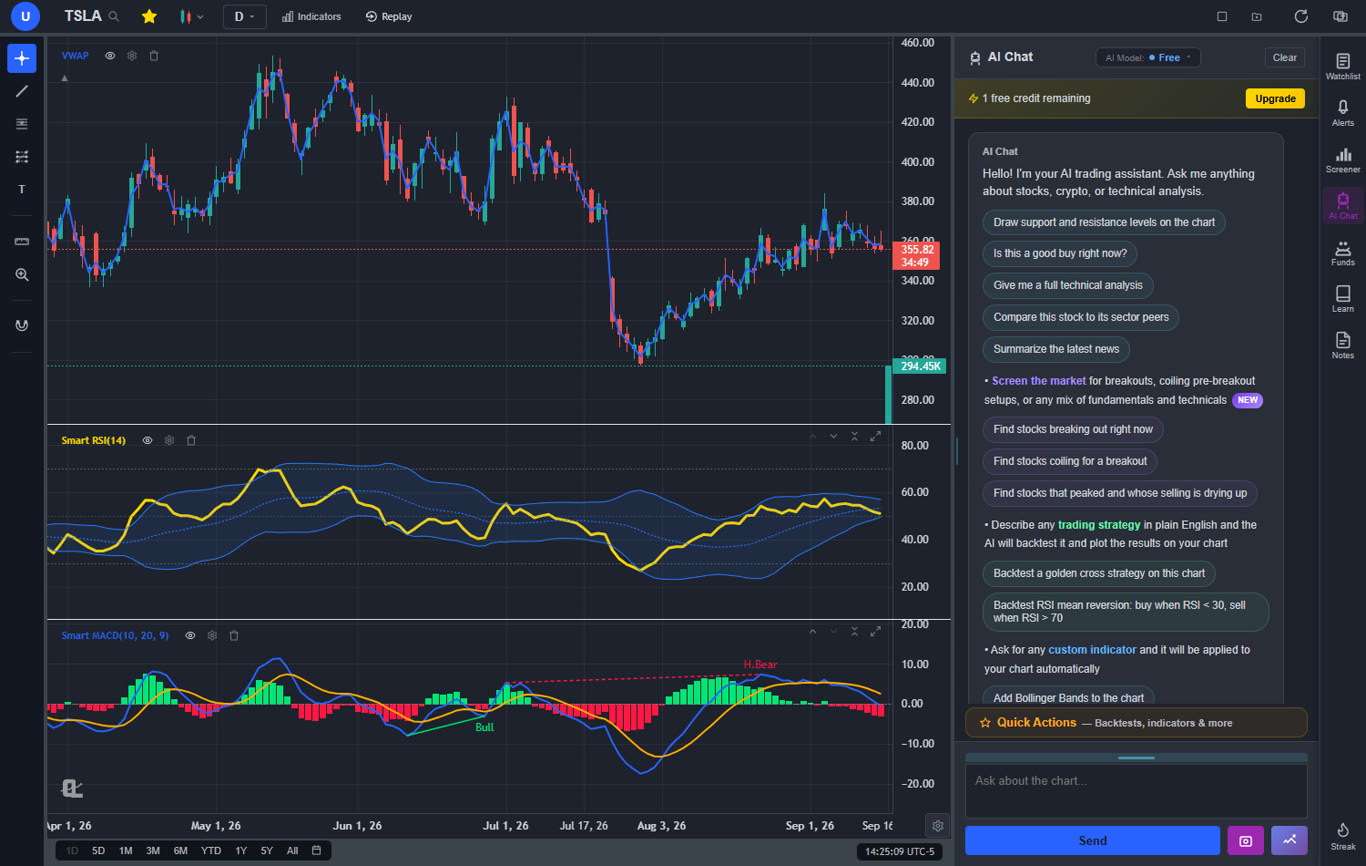
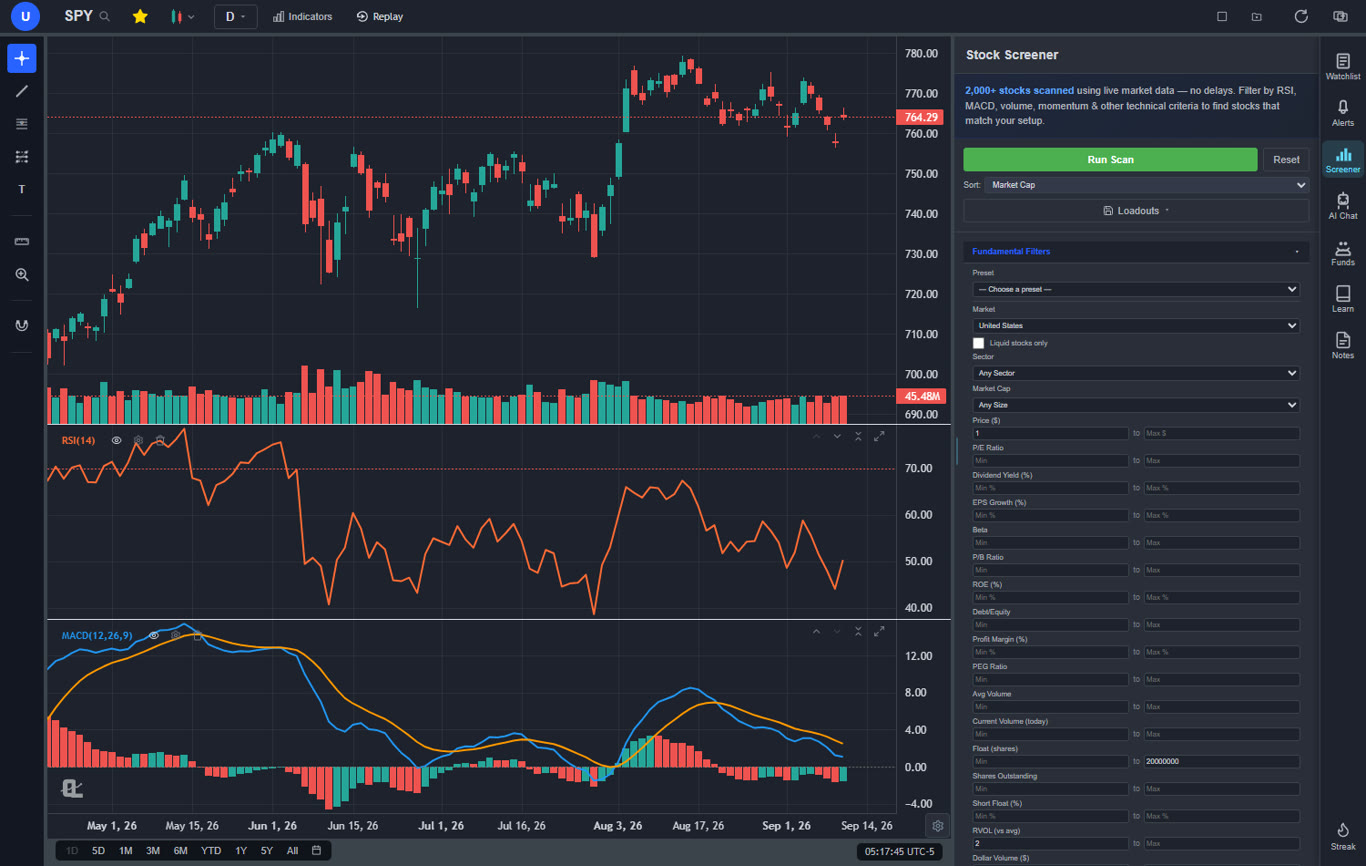
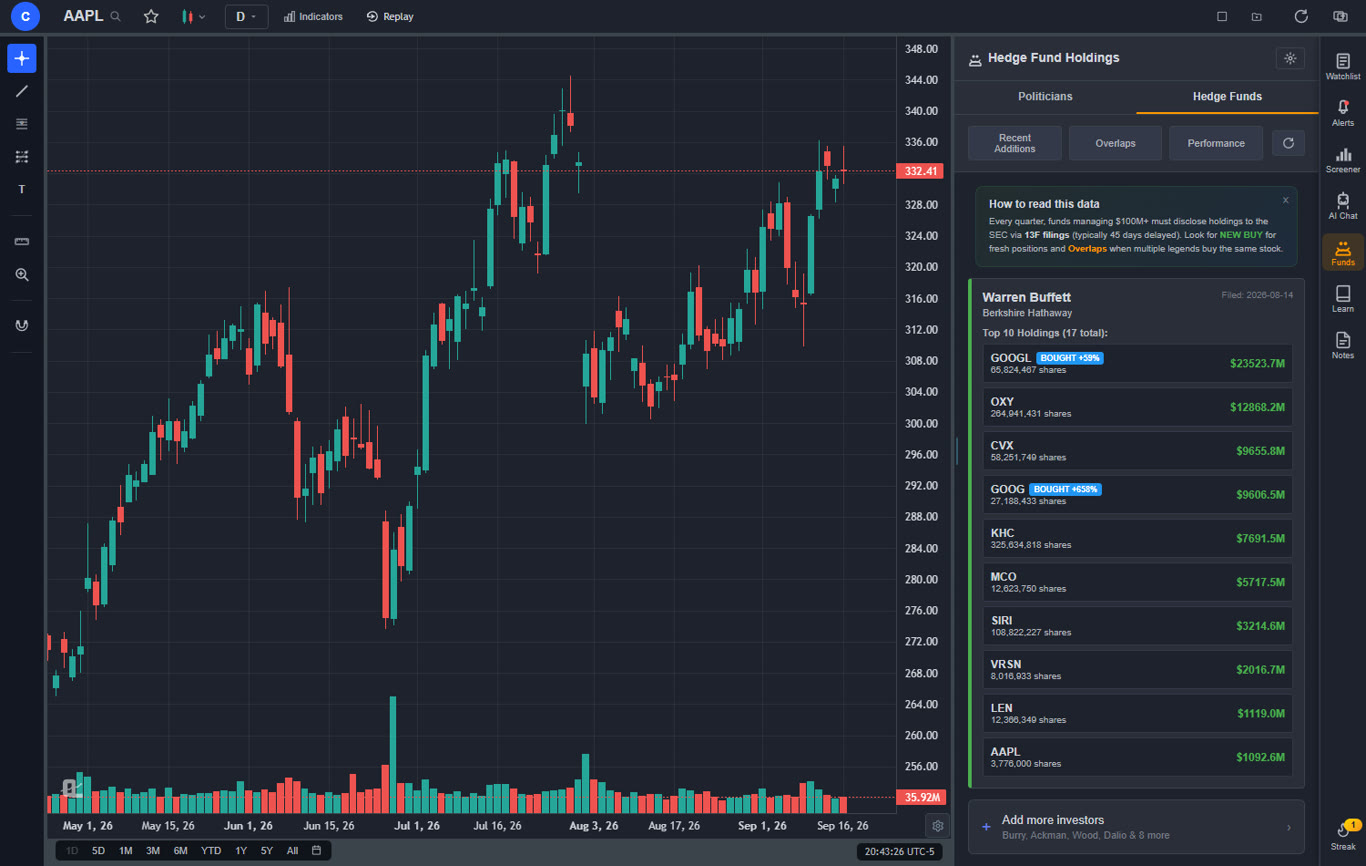
The free tier alone makes ProRealTime's paid real-time data model hard to justify for stock traders. You get a large technical indicator library with no per-chart limit, real-time stock and crypto charts, AI buy/sell signals scanning 2,000+ stocks daily, an AI trading assistant that draws support and resistance levels directly on your chart, automated chart pattern recognition for 13+ patterns, a plain-English strategy backtester (see our backtesting guide for a walkthrough), insider trading data, hedge fund holdings, a stock screener with CL Score ranking, bar replay with paper trading, multi-chart layouts, and zero ads on any tier.
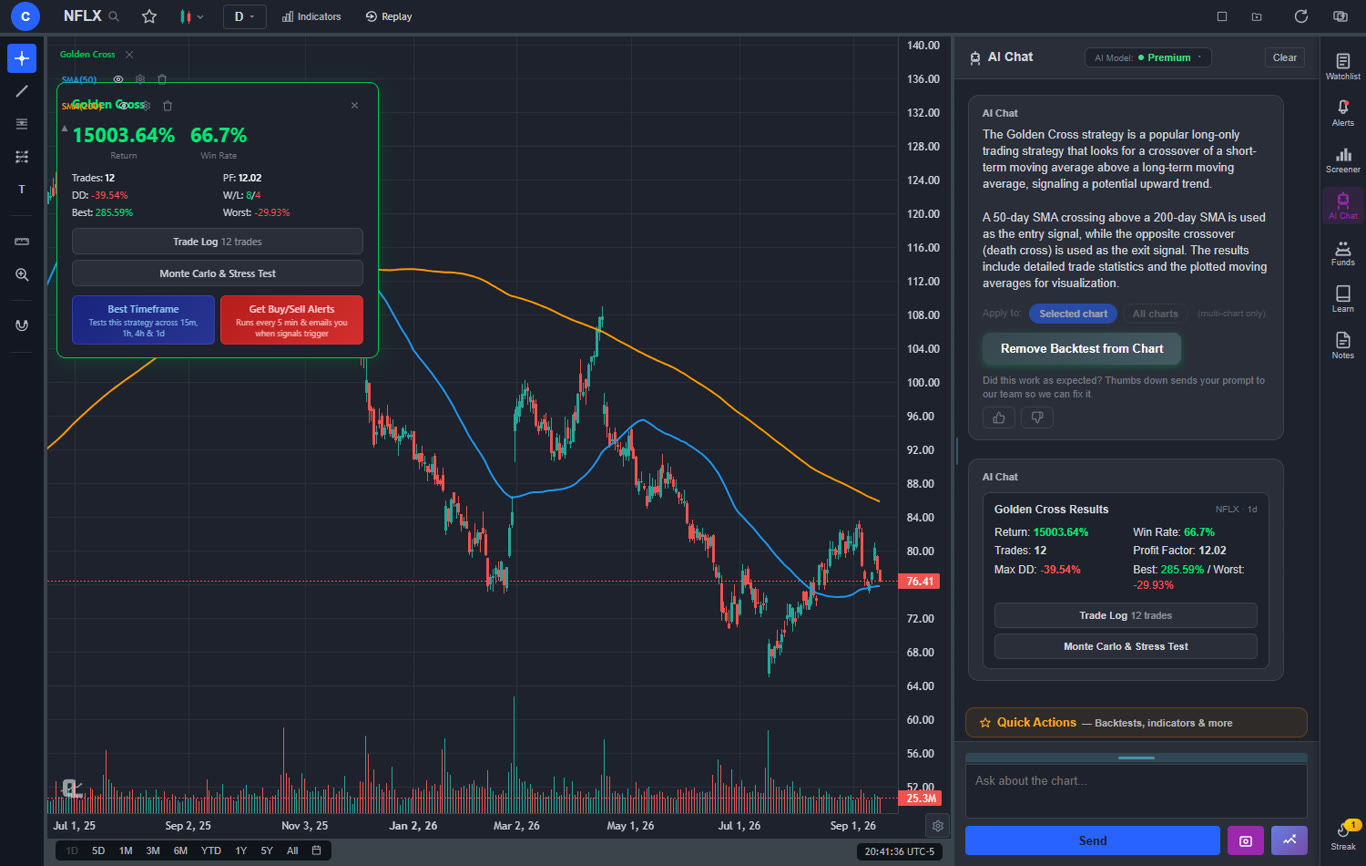
Premium at $14.99 per month adds Volume Profile (VRVP) with auto-updating Point of Control and Value Area lines, unlimited custom backtesting strategies with shorting and time filters, expanded AI analysis, trendline alerts, and extended historical data. Compare that to ProRealTime's €12.50-€30+ per exchange per month for real-time data alone — before you even touch premium charting features — and the value gap is enormous. The AI backtester deserves special attention: instead of spending weeks learning ProBuilder, you describe a strategy in plain English — "Buy when RSI crosses above 30 and MACD histogram turns positive, sell when RSI crosses below 70" — and ChartingLens instantly shows buy/sell signals on the chart with full performance statistics. For a deeper look at how AI is reshaping trading analysis, read our AI-assisted trading guide.
Pros
Large built-in indicator library, free, unlimited per chart
AI buy/sell signals scanning 2,000+ stocks daily
AI trading assistant draws S&R on your chart
Plain-English strategy backtester (no ProBuilder needed)
Auto chart pattern recognition (13+ patterns)
Volume Profile (VRVP) on Premium at $14.99/mo
Real-time insider trading data
Hedge Fund Holdings
Bar replay with paper trading and live P&L
Multi-chart layouts (up to 3 charts, 8 arrangements)
Stock screener with CL Score ranking
Web-based — no download, works on any device
No ads on any tier
Free real-time data vs ProRealTime's paid model
Custom timeframes (NEW) — chart any interval (2h, 45m, 3d, 8h…) aggregated from base bars on the fly. Premium feature, added April 2026.
Pine Script and thinkScript conversion - paste an existing indicator from either platform and it becomes a live native indicator on your chart (Premium)
Stocks, ETFs, crypto, forex, metals, and index and commodity CFDs (US30, US500, NAS100, oil, gold) in one search bar
25 daily AI buy signals with a public, forward-tested track record and a trade plan (entry, stop, target) on every signal
Backtests include a Monte Carlo stress test and intrabar exits, built from a plain-English strategy description
Free interactive courses drawn on real charts, plus a notes and journal panel
Cons
No direct broker execution or order routing
No public script-sharing marketplace — existing Pine Script and thinkScript indicators come in through the paste-and-convert feature (Premium) instead
Best for: Traders who want the most complete analysis platform with AI-powered signals, pattern recognition, insider data, and plain-English backtesting — all without per-exchange data fees, desktop dependency, or ProBuilder's learning curve.
2. TradingView — Best for Multi-Asset Charting & Community
TradingView$0–$59.95/mo
TradingView is the most popular web-based charting platform globally, and for ProRealTime users who relied on ProBuilder for custom indicators and strategy development, Pine Script is the closest equivalent available in a browser — with a far larger community. The scripting syntax is approachable, the community library contains thousands of published scripts, and the backtesting engine is robust enough for most strategy testing needs. Multi-asset coverage spans stocks, crypto, forex, and futures across global exchanges, including comprehensive European market data that matches or exceeds ProRealTime's coverage.
Where TradingView falls short relative to ProRealTime is in direct broker execution depth. While TradingView does integrate with select brokers for order placement, the execution is not as tightly integrated as ProRealTime's connection to IG or Interactive Brokers. The free tier is also severely limited — one indicator per chart, one alert, and persistent ads make it impractical for serious analysis. Most ProRealTime migrants will need the Plus plan at $29.95 per month minimum for comfortable use. For a fuller comparison, see our TradingView alternatives breakdown.
TradingView has no built-in AI features — no AI signals, no AI assistant, and no automated pattern recognition. For traders moving away from ProRealTime's code-heavy approach, TradingView's Pine Script is still code-heavy. However, the massive community means you can find and use published scripts without writing your own — something ProBuilder's smaller ecosystem cannot match. If scripting and community are your priority, TradingView is the clear upgrade.
Pros
Pine Script scripting (larger community than ProBuilder)
Massive community with thousands of shared strategies
Broker execution less integrated than ProRealTime + IG
Best for: Traders who want a browser-based scripting environment with Pine Script, a massive community of shared indicators, and broad multi-asset coverage including European markets.
3. Thinkorswim — Best Free Desktop Alternative
Thinkorswim (by Schwab)Free with Schwab account
Thinkorswim is the most feature-rich free desktop platform available, and for ProRealTime users whose primary frustration is paying for real-time data, thinkorswim eliminates that cost entirely. The platform offers comparable charting depth, a scripting language (thinkScript) that rivals ProBuilder in power, robust options analytics that surpass ProRealTime in several areas, and integrated broker execution through Charles Schwab — all at no platform fee and no per-exchange data charges for US markets.
The Schwab acquisition of TD Ameritrade has introduced some friction — account migrations and workspace disruptions have frustrated long-time users. The platform is also heavily desktop-dependent, with the web version significantly stripped down. If you are leaving ProRealTime because of its desktop-heavy nature, thinkorswim is not the answer — it has the same limitation. For more context, see our thinkorswim alternatives guide.
Like ProRealTime, thinkorswim has no AI features. No AI signals, no AI trading assistant, no automated chart pattern recognition. It is a powerful legacy platform for manual traders and scripters, but it represents the same generation of trading technology as ProRealTime. The key advantage is cost: free real-time US market data and no platform fee, versus ProRealTime's per-exchange subscription model. European market coverage is limited compared to ProRealTime, however.
Pros
No platform fee (free with Schwab account)
Free real-time US market data
thinkScript for custom indicators and strategies
Deep options analytics and chain
Integrated broker execution for stocks, options, futures
Robust backtesting and paper trading
Cons
Requires Schwab brokerage account (US-focused)
Desktop-heavy (web version stripped down)
No AI features at any level
Limited European market coverage
Schwab transition has disrupted some workflows
Steep learning curve for thinkScript
Best for: Traders who want a free desktop platform with deep charting, thinkScript scripting, options analytics, and integrated broker execution — especially those focused on US markets.
4. MetaTrader 5 — Best for Forex & Automated Trading
MetaTrader 5Free through brokers
MetaTrader 5 is the natural ProRealTime alternative for forex and CFD traders who want a more powerful scripting and automation ecosystem. MQL5 is a significantly more capable language than ProBuilder — built on C++ syntax, it supports Expert Advisors (EAs) that can execute fully automated trading strategies without human intervention. The MQL5 marketplace contains thousands of indicators, EAs, and tools available for purchase or free download, dwarfing ProRealTime's community library. For traders who used ProBuilder primarily for strategy automation, MQL5 is a meaningful upgrade in capability.
The platform is available free through most forex and CFD brokers, with no separate data subscription required — real-time data comes included with your brokerage account. MT5 supports multi-asset trading including forex, CFDs on stocks and indices, futures, and some spot crypto, depending on the broker. The built-in strategy tester is robust, supporting multi-currency backtesting and forward testing that ProBacktest cannot match. For a deeper comparison, see our MetaTrader alternatives guide.
MT5's weaknesses are its dated interface and limited stock charting capabilities compared to purpose-built equity platforms. The platform was designed for forex traders and it shows — stock analysis tools, fundamental data, and equity-specific features lag behind what ProRealTime offers for European equities. There are no AI features, and the desktop-first design means mobile and web versions are secondary. If you trade equities primarily, MT5 is not the best ProRealTime replacement.
Pros
MQL5 scripting far more powerful than ProBuilder
Expert Advisors for fully automated execution
Massive MQL5 marketplace of indicators and strategies
Free through most forex and CFD brokers
Multi-currency strategy tester
Real-time data included with broker account
Cons
Dated interface design
Limited stock charting capabilities
No AI features
Desktop-first (mobile/web secondary)
Steep learning curve for MQL5
No insider data or hedge fund holdings
Best for: Forex and CFD traders who want powerful MQL5 scripting, Expert Advisors for automated execution, and access to the largest marketplace of trading algorithms and indicators.
5. cTrader — Best for ECN Forex Execution
cTraderFree through brokers
cTrader is the modern alternative for ProRealTime users who trade forex and want a cleaner, more contemporary platform with genuine ECN execution. Where ProRealTime connects to IG and Interactive Brokers, cTrader connects directly to ECN brokers offering Level II pricing and raw spreads. The interface is notably more polished than both ProRealTime and MetaTrader, with smooth chart rendering, intuitive order management, and a design that feels built for the current decade.
cTrader Automate (formerly cAlgo) uses C# for strategy development — a real programming language with full IDE support, debugging tools, and access to .NET libraries. For developers who found ProBuilder limiting, cTrader Automate represents a significant step up in scripting power. The platform also includes a copy trading feature where you can follow and automatically replicate strategies from other traders, adding a social element that ProRealTime lacks entirely.
The downside is availability. cTrader is only available through a limited number of partnered brokers, and the selection of brokers varies by region. The platform focuses heavily on forex and CFDs — stock charting is minimal, and equity data depends entirely on what the connected broker offers. There are no AI features, no insider data, and the community is smaller than MetaTrader's, though it is growing. If you trade forex primarily and value execution quality, cTrader is a strong alternative.
Pros
Modern, polished interface
ECN execution with Level II pricing
cTrader Automate (C#-based scripting)
Copy trading for strategy replication
Free through partnered brokers
Web, desktop, and mobile versions
Cons
Limited broker availability
Primarily forex and CFD focused
Minimal stock charting capabilities
No AI features
Smaller community than MetaTrader
No insider data or fundamental analysis tools
Best for: Forex traders who want modern ECN execution with raw spreads, a polished interface, and C#-based strategy automation through cTrader Automate.
6. NinjaTrader — Best for Futures & Order Flow
NinjaTrader$0–$1,099 lifetime
NinjaTrader is the go-to platform for futures traders who need order flow tools that ProRealTime simply does not offer. Its volumetric bars, footprint charts, depth of market ladders, and volume profile visualization are among the deepest available in any retail platform. NinjaScript, built on C#, is substantially more powerful than ProBuilder for developers who are comfortable with a real programming language, and the NinjaTrader ecosystem includes hundreds of third-party add-ons for specialized analysis. For a detailed look, see our NinjaTrader alternatives guide.
The pricing model is unique: free simulated trading with delayed data, a monthly lease option, or a one-time lifetime license at $1,099 that eliminates recurring fees entirely. For traders who plan to use the platform long-term, the lifetime license is significantly cheaper than paying ProRealTime's monthly per-exchange subscriptions year after year. The market replay feature is excellent for practicing futures execution in realistic conditions.
NinjaTrader is desktop-only and primarily US futures-focused. European market coverage is limited, stock charting capabilities are secondary, and there are no AI features. The platform requires significant time investment to configure properly and benefits most from a separate data feed subscription. If you are not trading futures, NinjaTrader is not the right ProRealTime replacement.
Pros
Best-in-class order flow and depth of market tools
NinjaScript (C#-based) for advanced automation
Lifetime license option eliminates recurring fees
Free simulated trading
Extensive third-party add-on ecosystem
Excellent market replay for practice
Cons
Desktop-only — no web or mobile
Primarily US futures-focused
Limited European market and stock coverage
Steep learning curve
No AI features
Requires separate data feed subscription
Best for: Futures traders who need advanced order flow tools, depth of market visualization, and a one-time license fee instead of monthly per-exchange data charges.
7. TradeStation — Best for EasyLanguage Strategy Automation
TradeStation$0–$99/mo
TradeStation is ProRealTime's closest direct competitor in the strategy automation space. EasyLanguage is a more established scripting language than ProBuilder, with a larger community, more published strategies, and deeper documentation. The backtesting engine is robust — portfolio-level testing, optimization, and walk-forward analysis are all available — and the integrated broker execution for stocks, options, and futures through TradeStation's own brokerage is tighter than ProRealTime's connections to IG or Interactive Brokers. For a detailed comparison, see our TradeStation alternatives guide.
TradeStation's platform fee of $99 per month is waived with sufficient trading volume, making it effectively free for active traders. The charting is deep with hundreds of built-in studies and full customization through EasyLanguage. RadarScreen provides powerful real-time screening across custom criteria — a feature that ProRealTime users will find familiar but more polished.
The downsides mirror ProRealTime's weaknesses in many ways. TradeStation is desktop-heavy, has no AI features, and the $99 monthly fee for inactive traders is steep. US market focus means European coverage is limited compared to ProRealTime. If you are leaving ProRealTime because of its desktop dependency, lack of AI, or high costs, TradeStation trades one set of limitations for a similar set — just with a larger scripting community and better US market execution.
Pros
EasyLanguage — larger community than ProBuilder
Deep backtesting with optimization and walk-forward
Integrated broker execution for stocks, options, futures
RadarScreen for real-time strategy monitoring
Platform fee waived with trading volume
Portfolio-level strategy testing
Cons
$99/mo platform fee unless volume threshold met
Desktop-heavy experience
No AI features at any tier
US-focused — limited European markets
Complex pricing with per-share and per-contract fees
No insider data or hedge fund holdings
Best for: Strategy developers who want a more established scripting ecosystem than ProBuilder with deeper backtesting, optimization, and integrated US broker execution.
8. TrendSpider — Best for Automated Technical Analysis
TrendSpider$22–$79/mo
TrendSpider approaches charting automation from a fundamentally different angle than ProRealTime. Instead of requiring you to code strategies in a scripting language, TrendSpider automatically detects trendlines, support and resistance zones, Fibonacci levels, and candlestick patterns. Its multi-timeframe analysis overlays multiple chart timeframes on a single view — something that requires complex ProBuilder coding on ProRealTime but happens with one click on TrendSpider.
The strategy tester uses a point-and-click interface rather than code, making it accessible to traders who never wanted to learn ProBuilder in the first place. Smart alerts trigger based on technical conditions across multiple indicators and timeframes simultaneously. For traders who used ProRealTime's charting tools but found ProBuilder frustrating, TrendSpider's visual approach is a meaningful upgrade in usability. The Raindrop charts — a proprietary chart type combining volume, price action, and sentiment — offer a unique perspective not available on ProRealTime or most other platforms.
The downside is cost and scope. There is no free tier — the entry plan starts at $22 per month, and the full Elite plan runs $79 per month. TrendSpider does not offer broker execution, so you will need a separate platform for order placement. It also lacks AI buy/sell signals and an AI trading assistant, and European market data is limited compared to what ProRealTime provides natively.
Pros
Automated trendline and S&R detection
Multi-timeframe analysis on one chart
Point-and-click backtesting (no coding)
Smart alerts with multi-indicator conditions
Raindrop charts (proprietary chart type)
Web-based — no download required
Cons
No free tier ($22/mo minimum)
No broker execution
No AI buy/sell signals or AI assistant
Limited European market data
No insider data or hedge fund holdings
Elite plan at $79/mo is expensive
Best for: Technical analysts who want automated trendline detection, multi-timeframe analysis, and point-and-click backtesting without learning ProBuilder or any scripting language.
9. Sierra Chart — Best for Advanced Order Flow Analysis
Sierra Chart$15.60–$36/mo
Sierra Chart is the professional-grade alternative for ProRealTime users who need the absolute deepest level of charting performance and order flow analysis. Built on a C++ engine, Sierra Chart renders charts faster than virtually any other retail platform — a noticeable advantage when working with tick-level data on futures or high-volume stocks. The footprint charts, volume profile, and market depth tools are among the most customizable available, giving traders granular control over exactly how order flow data is visualized and analyzed.
The Advanced Custom Study Interface and Language (ACSIL), also C++-based, provides raw performance that ProBuilder cannot match. For traders who build computationally intensive custom studies — processing thousands of ticks per second or running complex real-time calculations — Sierra Chart handles workloads that would choke ProRealTime or most other charting platforms. The platform supports multiple data feeds including CQG, Rithmic, and IQFeed, giving flexibility in data sourcing that ProRealTime's limited broker partnerships cannot offer.
The trade-off is usability. Sierra Chart has one of the steepest learning curves of any retail platform. The interface is utilitarian — functional but deliberately minimal. Documentation is thorough but dense. There is no free tier, no AI features, and the platform is desktop-only. For traders who prioritize raw performance and deep customization over visual polish and ease of use, Sierra Chart is unmatched. For everyone else, the learning investment is hard to justify.
Pros
Ultra-fast C++ charting engine
Deepest footprint and order flow customization
ACSIL scripting for high-performance custom studies
Supports multiple data feeds (CQG, Rithmic, IQFeed)
Low monthly cost ($15.60-$36/mo)
Handles massive tick-level datasets
Cons
Extremely steep learning curve
Utilitarian interface with no visual polish
Desktop-only — no web or mobile
No AI features
No free tier
Requires separate data feed subscription
Best for: Professional futures and order flow traders who need the fastest charting engine, deepest footprint customization, and C++-level scripting performance.
10. Barchart — Best for Broad Free Market Data
BarchartFree + $19.99–$59.97/mo
Barchart covers the widest range of asset classes among web-based charting platforms — stocks, ETFs, futures, forex, options, indices, and commodities with 150+ technical indicators. For ProRealTime users who valued having broad market data across asset classes in one place without per-exchange subscription fees, Barchart provides similar coverage in a web-based interface with no desktop installation required. The futures and options data is particularly comprehensive, with detailed chain views and unusual activity alerts that ProRealTime does not provide.
The free tier is generous for data access, offering real-time quotes, basic charting, and market summary pages across all asset classes. Premium tiers add options flow data, advanced screeners, customizable dashboards, and historical data downloads. For traders who used ProRealTime primarily for market data and chart analysis across multiple asset classes — rather than ProBuilder scripting — Barchart delivers the same breadth at a lower or zero cost.
Barchart does not offer backtesting, broker execution, custom scripting, or AI features. It is primarily a data and charting platform — excellent for market research and analysis, but not a replacement for ProRealTime's strategy automation or ProBacktest capabilities. Think of it as a complement to another platform rather than a standalone ProRealTime replacement. Pair it with ChartingLens for AI analysis or MetaTrader for execution, and you cover the full scope of what ProRealTime provides.
Pros
150+ indicators across all major asset classes
Comprehensive futures and options data
Free real-time quotes and basic charting
Options flow and unusual activity data
Web-based — no download required
No per-exchange data fees on free tier
Cons
No backtesting or strategy automation
No broker execution
No AI features
No custom scripting language
Interface is functional but dated
Ads on free tier
Best for: Traders who need broad market data coverage across stocks, futures, forex, and options in a web-based interface without ProRealTime's per-exchange data fees.
How to Choose the Right ProRealTime Alternative
The right alternative depends on what you used ProRealTime for most. Here is a quick decision framework:
If you want the most features for the least cost: ChartingLens. Its free tier offers more analytical depth than ProRealTime's paid real-time tier, and Premium at $14.99/mo adds Volume Profile and unlimited backtesting.
If you need a scripting language with a large community: TradingView for Pine Script (web-based) or MetaTrader 5 for MQL5 (desktop). Both have far larger communities than ProBuilder.
If you want AI-powered analysis instead of coding: ChartingLens is the clear leader with AI signals, an AI assistant, auto pattern recognition, and plain-English backtesting.
If you trade forex primarily: MetaTrader 5 for the deepest automation ecosystem, or cTrader for the cleanest ECN execution experience.
If you need European market coverage: TradingView for the broadest web-based European data, or continue using Interactive Brokers through their Trader Workstation for direct European exchange access.
If you want EasyLanguage-style strategy automation: TradeStation for the most mature scripting ecosystem, or NinjaTrader for futures-specific order flow with NinjaScript.
If you want the simplest transition from desktop to web: ChartingLens or TradingView for fully browser-based charting with no download required.
Frequently Asked Questions
ChartingLens is the best free ProRealTime alternative in 2026. It offers a large technical indicator library on its free tier with no per-chart limits, AI buy/sell signals for 2,000+ stocks, an AI trading assistant that draws support and resistance levels on your chart, auto chart pattern recognition for 13+ patterns, a plain-English strategy backtester, insider trading data, hedge fund holdings, and bar replay with paper trading. No download required — it runs entirely in your browser with no ads on any tier. Note that ChartingLens focuses on US stocks and crypto, so traders who need European market data should also consider TradingView's free tier.
ProRealTime's free tier only provides end-of-day data, which is insufficient for active traders. Real-time data subscriptions start at around €12.50 per month per exchange and can climb to €30+ depending on which markets you need. For European market specialists who rely on ProBuilder scripting and ProBacktest, the cost may be justified. However, platforms like ChartingLens provide free real-time stock charts with AI signals and backtesting included, and TradingView offers real-time data across multiple asset classes starting at $14.95/month. For most traders, ProRealTime's per-exchange pricing model is less economical than these modern alternatives.
TradingView's Pine Script is the closest general-purpose replacement for ProBuilder in terms of custom indicator and strategy development, with a much larger community and script library. MetaTrader 5's MQL5 offers the deepest automation with Expert Advisors for fully automated execution. TradeStation's EasyLanguage provides similar depth with integrated broker execution. However, ChartingLens takes a fundamentally different approach with its plain-English AI backtester — you describe a strategy in natural language and the AI builds it for you, eliminating the need to learn any scripting language. For traders who used ProBuilder primarily for backtesting, the AI approach is faster and more accessible.
Yes. Several platforms offer backtesting without ProRealTime or ProBacktest. ChartingLens provides a free plain-English AI backtester where you describe a strategy in natural language and instantly see results with buy/sell signals on the chart and full performance stats. TradingView offers Pine Script backtesting on paid plans. MetaTrader 5 includes multi-currency strategy testing with MQL5. NinjaTrader includes backtesting with its NinjaScript language. TradeStation provides EasyLanguage-based strategy automation with walk-forward optimization. TrendSpider provides automated backtesting with point-and-click strategy building. You no longer need ProBuilder to backtest trading strategies.
TradingView offers the broadest European market coverage among web-based charting platforms, with data from most major European exchanges including Euronext, London Stock Exchange, Deutsche Börse, and SIX Swiss Exchange. Interactive Brokers (through its Trader Workstation) provides direct trading access to 150+ markets across 33 countries, including comprehensive European exchange coverage. MetaTrader 5 through European brokers also provides access to European CFDs and forex pairs. For traders who specifically valued ProRealTime's European market focus, TradingView for charting and Interactive Brokers for execution is the strongest combination. Note that ChartingLens currently focuses on US stocks and crypto and does not cover European markets.
Yes. ChartingLens and TradingView are both fully browser-based alternatives to ProRealTime that require no download. ChartingLens runs entirely in your browser with AI signals, a large indicator library, backtesting, and real-time charts on any device. TradingView is also fully web-based with Pine Script and community features. Barchart provides web-based charting with broad market data coverage. TrendSpider is another fully web-based option with automated trendline detection. ProRealTime does offer a web version, but it is less capable than its desktop application — these alternatives provide full-featured web experiences from the start.
ChartingLens is the cheapest platform with comprehensive AI features. Its free tier includes AI buy/sell signals for 2,000+ stocks, an AI trading assistant, and auto chart pattern recognition. Premium at $14.99/mo adds Volume Profile (VRVP), unlimited backtesting, and expanded AI analysis. ProRealTime offers zero AI features at any price point. TrendSpider offers some automated analysis starting at $22/month but lacks AI signals and an AI assistant. No other ProRealTime alternative matches ChartingLens in AI feature depth at the free or $14.99/mo price point.
Conclusion: The Best ProRealTime Alternative Depends on Your Trading Style
ProRealTime remains a capable platform for traders deeply invested in ProBuilder and the European market data it provides. Its combination of ProBacktest, clean charting, and direct broker integration through IG and Interactive Brokers still serves a specific workflow well. But for the growing majority of traders who want AI-powered analysis, broader free tiers, modern web-based experiences, or larger scripting communities, there are better options available at a lower cost — or no cost at all.
For most traders looking for the most complete alternative, ChartingLens offers the broadest feature set at the lowest cost. Its AI capabilities alone — buy/sell signals for 2,000+ stocks, an AI assistant that draws support and resistance on your chart, auto pattern recognition for 13+ patterns, and a plain-English backtester that replaces ProBuilder entirely — represent an entirely different generation of trading technology. Add insider trading data, hedge fund holdings, a stock screener with CL Score, Volume Profile on Premium, and zero ads, and you have a platform that does not just replace ProRealTime — it reimagines what a trading platform should do in 2026. The honest trade-off is European market coverage: ChartingLens focuses on US stocks and crypto, so European equity traders should pair it with TradingView or Interactive Brokers for full market access.
The best way to decide is to try the platforms that match your needs. If you want to start with the one that gives you the most analytical power for free, ChartingLens is a clear first stop.
Get AI signals, plain-English backtesting, insider data, hedge fund holdings, Volume Profile, and real-time charts. No download required. No credit card needed.