By ChartingLens TeamUpdated May 8, 202619 min read
📅 May 2026 Update
ChartingLens just launched a new tier structure — Premium at $14.99/mo with sensible quotas (20 alerts, 10 layouts, 20 AI credits/day) and Pro at $29.99/mo with unlimited everything. The Free tier is unchanged: real-time stocks, crypto, forex & metals, all chart types, all drawing tools, cloud sync, and insider data. Yearly plans save 17%. Compare all plans →
Webull attracted millions of retail traders with commission-free trading, a polished mobile app, and free real-time data. For many investors who started their trading journey in the early 2020s, Webull was the first platform that felt modern, fast, and genuinely free. The clean interface, extended-hours trading, and paper trading mode made it an appealing alternative to legacy brokerages that charged commissions and offered clunky desktop software.
But in 2026, traders are outgrowing Webull's limitations. What works for placing your first stock order does not hold up when you are trying to develop and validate a real trading strategy. The charting tools are basic — limited indicators, minimal drawing tools, and no AI features at any tier. There is no backtesting, no pattern recognition, no insider data, and the desktop experience lags significantly behind the mobile app. Traders who started on Webull and have since developed more sophisticated strategies are looking for platforms with real analytical depth.
The good news is that the trading platform landscape has expanded considerably. Whether you need advanced charting with AI-powered analysis, professional-grade technical tools, free Level 2 data, or simply a better charting experience to pair with your existing broker, there are strong alternatives available in 2026. Some are entirely free. Others offer paid tiers that deliver far more than Webull does at any price point.
This guide reviews 10 platforms that serve as genuine Webull alternatives. We cover charting-focused platforms, full-service brokerages, and everything in between. Whether you want to replace Webull entirely or simply add a dedicated charting tool alongside it, you will find a platform here that fits your needs.
What Webull Gets Wrong in 2026
Before diving into the alternatives, it is worth understanding exactly where Webull falls short. These are the specific limitations driving traders to look elsewhere:
Limited charting indicators (~20 basic indicators) — Webull offers roughly 20 technical indicators including the basics like moving averages, RSI, MACD, and Bollinger Bands. Dedicated charting platforms offer 50 to 400+ indicators. For any strategy beyond simple trend-following, Webull's library is insufficient.
No AI features at any tier — No AI buy/sell signals, no AI trading assistant, no AI-powered pattern recognition. In 2026, AI analysis has become a core differentiator among trading platforms, and Webull has not implemented any of it.
No strategy backtesting capability — You cannot test whether a trading strategy would have worked historically on Webull. There is no way to backtest a trading strategy without leaving the platform entirely.
Basic drawing tools compared to dedicated charting platforms — The drawing tools are functional on mobile but limited in precision. Fibonacci retracements, trendlines, and other essential tools feel clunky on Webull compared to platforms built specifically for charting.
No insider trading data or hedge fund holdings — Webull does not show you what corporate insiders are buying or selling, nor does it track the portfolio moves of legendary investors. This data is increasingly available on modern platforms.
Desktop app significantly weaker than mobile experience — Webull was built mobile-first, and the desktop version shows it. The layout is less intuitive, the charting feels bolted on, and the overall experience does not compete with platforms designed for desktop analysis.
No Volume Profile or advanced charting tools — Features like Volume Profile (VRVP), which shows trading activity at each price level, are absent. Day traders and swing traders who rely on volume analysis are left without key tools.
Primarily a broker, not an analysis platform — Webull's core function is trade execution. The charting is an add-on to that primary purpose, which means it will always lag behind platforms where analysis is the core product.
None of these limitations make Webull a bad platform. For commission-free trade execution with a clean mobile app, it remains a solid choice. But for serious analysis work, Webull needs to be supplemented with or replaced by a dedicated charting platform. Many traders solve this by keeping Webull for execution while using a platform like ChartingLens for all their charting and analysis — getting the best of both worlds without paying more.
Quick Comparison: All 10 Webull Alternatives
Here is how all 10 platforms compare across the features that matter most when evaluating a Webull alternative.
Scroll horizontally to see all columns →
Platform
Free Tier
AI Features
Indicators
Commission-Free Trading
Mobile App
Premium Cost
ChartingLens
✓
AI Signals + Assistant + Backtester
15+
✗
✓
$14.99/mo
TradingView
✓ (limited)
✗
400+
✗
✓
$14.95–$59.95/mo
Moomoo
Account req.
✗
~50
✓
✓
Free
Thinkorswim
Account req.
✗
300+
✓
✓
Free
Robinhood
✓
✗
~5
✓
✓
$5/mo (Gold)
Interactive Brokers
Account req.
✗
Limited
IBKR Lite
✓
Free
Fidelity
Account req.
✗
Many
✓
✓
Free
eToro
Account req.
Copy Trading
~60
✓
✓
Free
Barchart
✓
✗
150+
✗
Limited
$19.99–$59.97/mo
TradeStation
✗
✗
Many
✓
✓
$0–$99/mo
In-Depth Reviews of All 10 Webull Alternatives
1. ChartingLens — Best Overall Webull Alternative for Charting
ChartingLensFree + $14.99/mo Premium
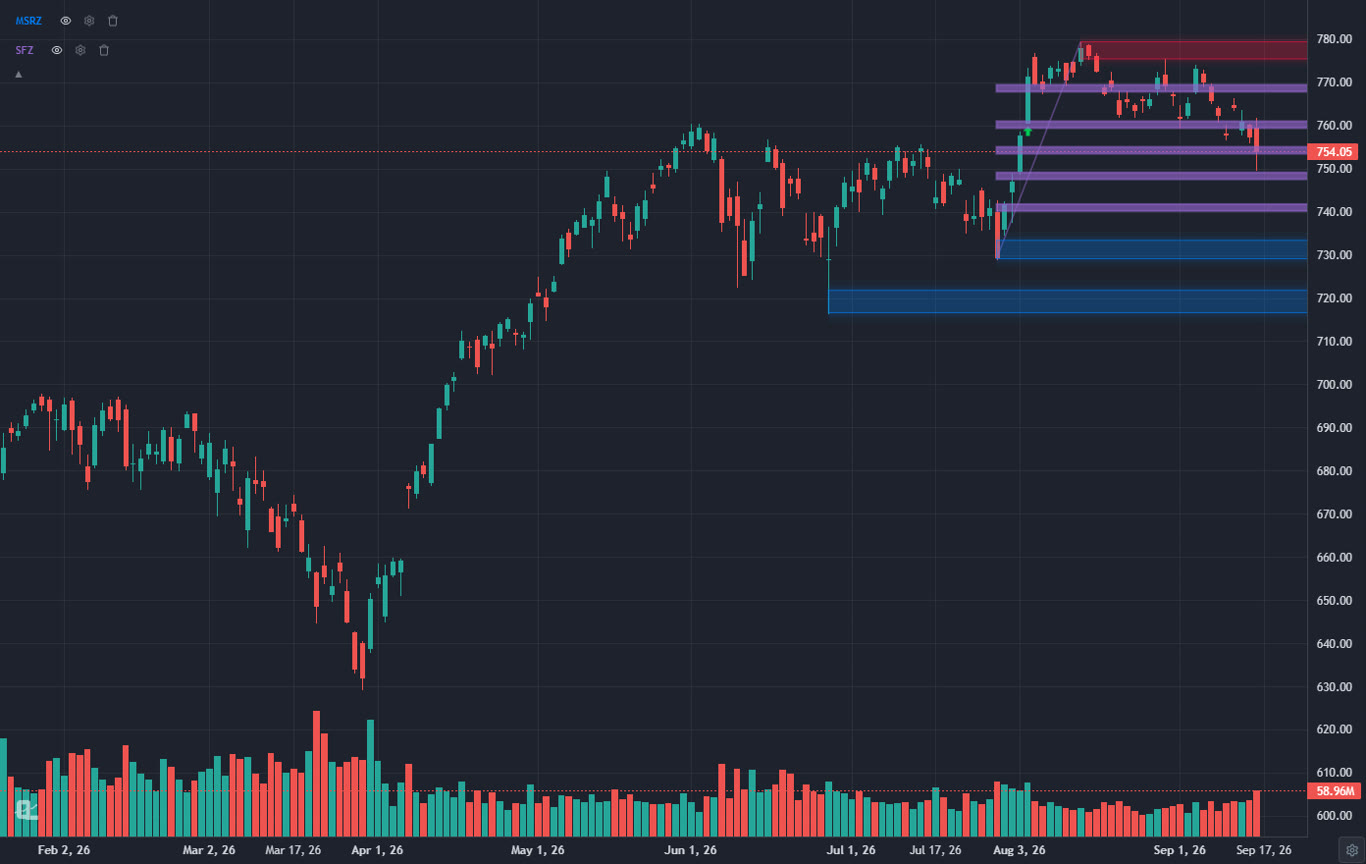
ChartingLens is the best Webull alternative for charting in 2026, and the gap is significant. Where Webull offers roughly 20 basic indicators and limited drawing tools, ChartingLens provides a large technical indicator library on its free tier with no cap on how many you can stack per chart, real-time charts for stocks and crypto, cloud-synced drawing tools, and zero ads on any tier. But the real story is what ChartingLens offers that Webull simply does not have at any price.
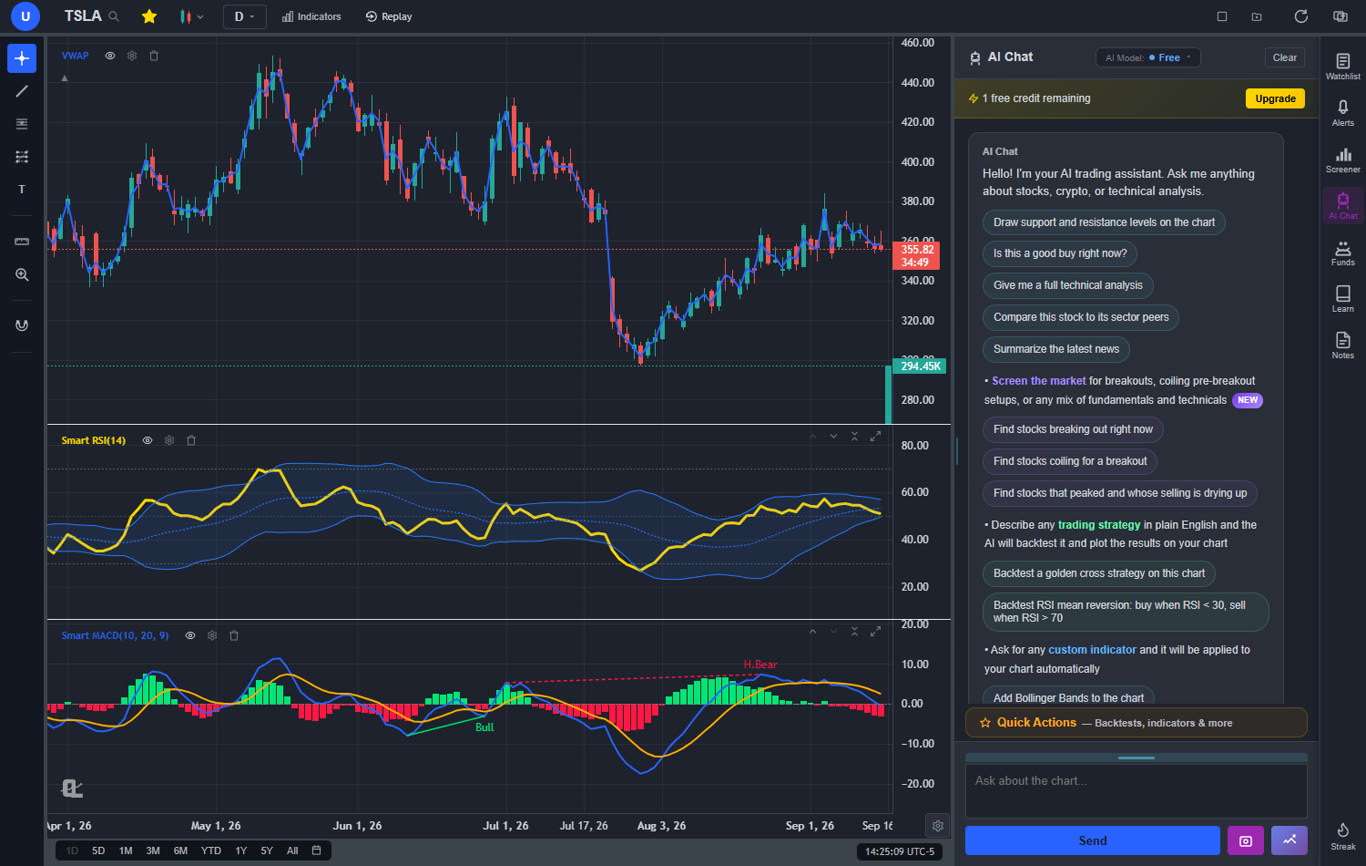
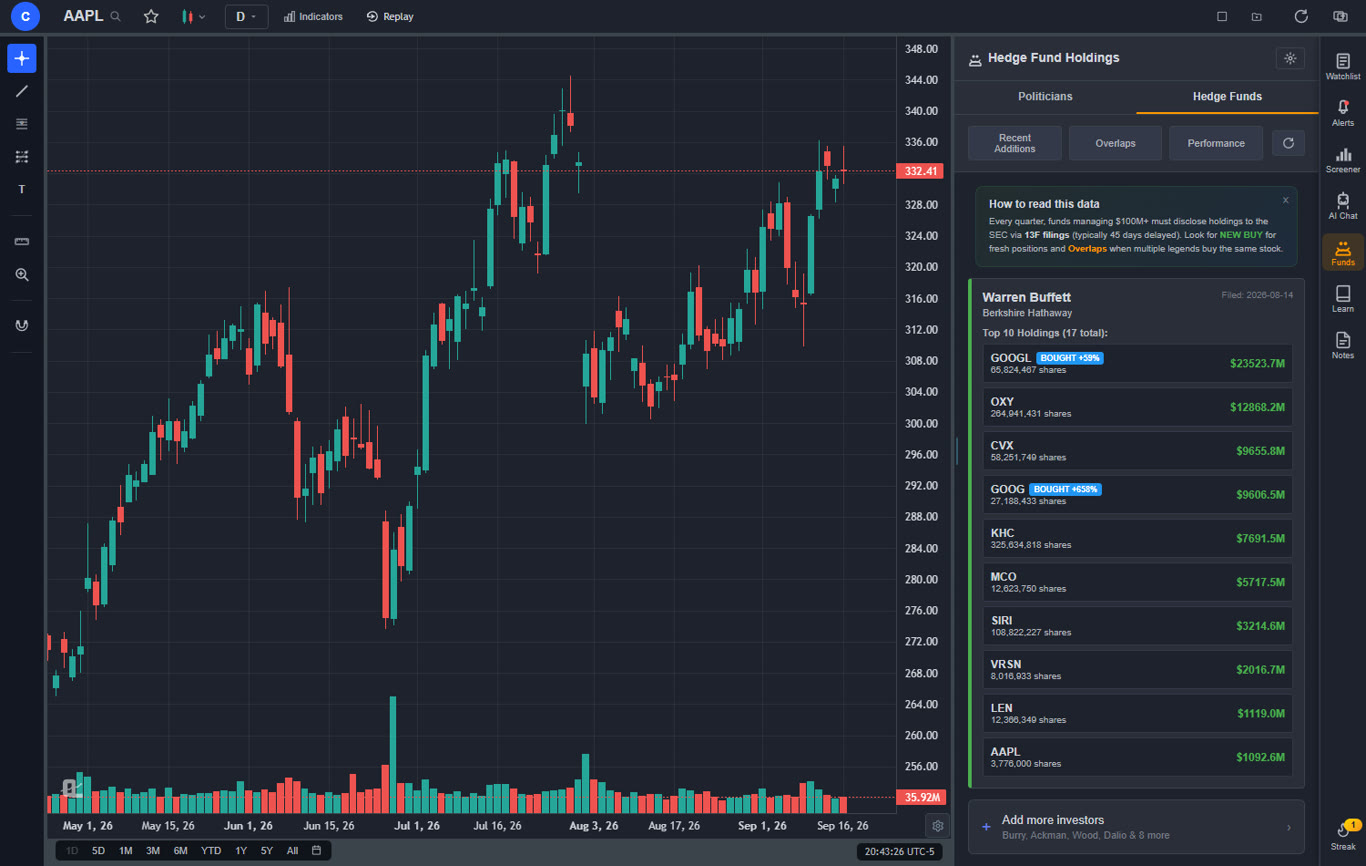
The platform includes a free AI trading assistant that you can ask about any stock, chart pattern, or trading concept — and it takes action on your chart. Ask it for support and resistance levels on any symbol and it will identify key price zones and draw them directly on your chart as color-coded lines. It generates AI buy and sell signals by scanning over 2,000 stocks daily for high-probability setups using machine learning. It features auto chart pattern recognition that identifies 13+ patterns including head-and-shoulders, double tops, wedges, and triangles automatically. And it integrates real-time insider trading data and hedge fund holdings, letting you see what corporate executives and legendary investors like Warren Buffett are buying and selling — all within the same interface where you do your charting. None of these features exist on Webull.
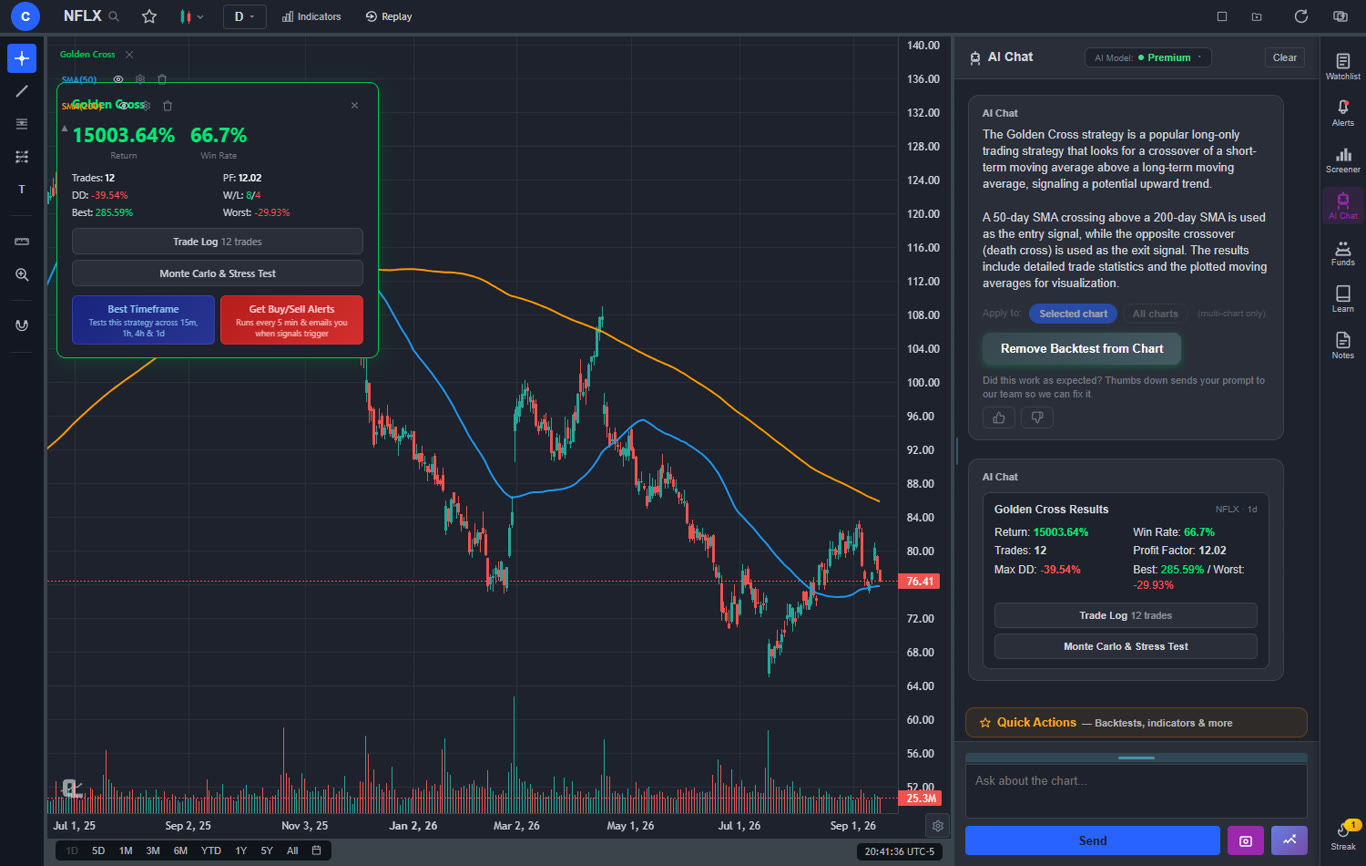
ChartingLens also includes a built-in AI strategy backtester that lets you test any trading strategy in plain English. Describe your logic — including shorting strategies, time-based filters like "only trade on Tuesdays" or "only trade 9am-11am EST," or multi-condition setups — and the AI builds it, runs it against historical data, and plots every buy and sell signal directly on your chart alongside a visual equity curve. Performance stats include total return, Sharpe ratio, win rate, profit factor, and max drawdown. The "Find Best Timeframe" feature automatically re-runs your strategy across 15m, 1h, 4h, and 1D timeframes and ranks them by a composite performance score. This is the kind of capability that Webull users simply cannot access without leaving the platform entirely.
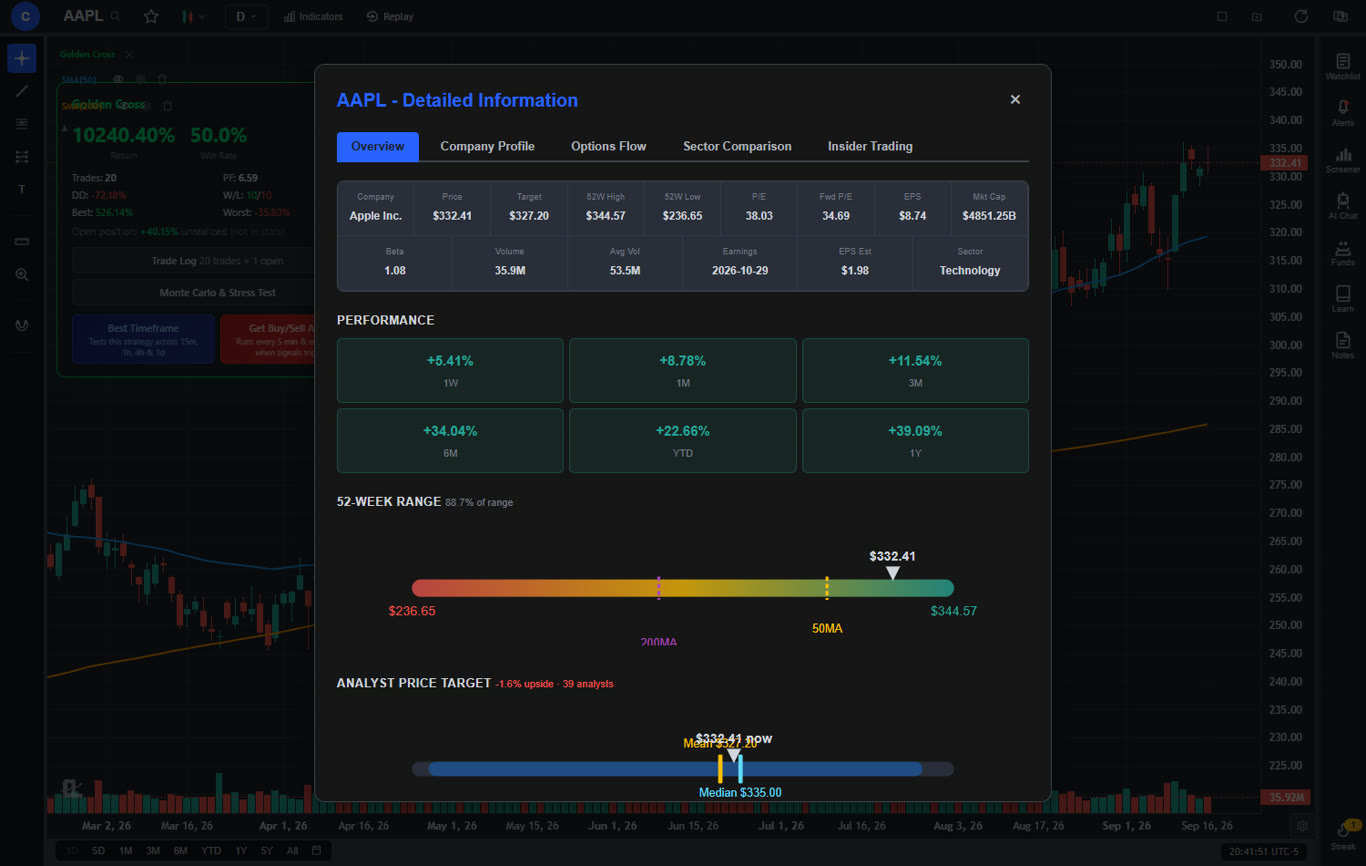
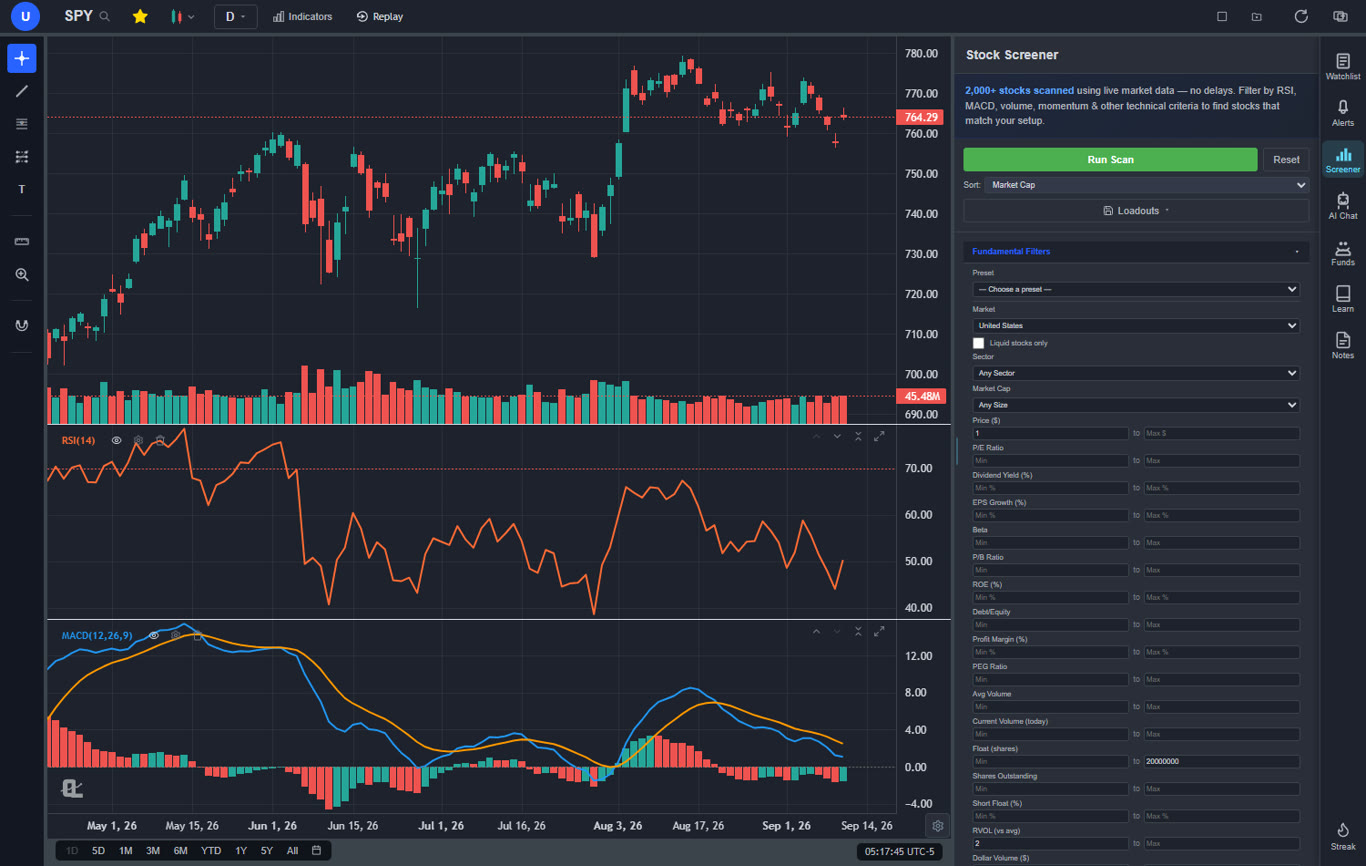
The company fundamentals panel opens a full-screen modal with income statements, balance sheets, cash flow history, analyst price targets, buy/sell/hold recommendations, institutional ownership, insider holdings, and a dedicated Options Flow tab showing options activity by expiration, strike price, and put/call ratios. Additional standout features include Bar Replay with paper trading for practicing price action reading, multi-chart layouts with up to three fully independent charts, a stock screener with 12 fundamental filters and CL Score ratings, and trendline alerts. The premium plan at $14.99 per month unlocks Volume Profile (VRVP), deeper AI analysis, unlimited custom backtesting, and extended historical data.
The important insight for Webull users is that ChartingLens is not trying to replace Webull as a broker. It is the ideal charting companion to Webull. You use ChartingLens for all your analysis — AI signals, chart reading, pattern recognition, insider data, strategy backtesting — and then switch to Webull to execute your trades commission-free. Many traders already use this exact workflow. You get Webull's free execution combined with ChartingLens's analytical depth, which together form a more powerful setup than any single platform provides alone.
Pros
Large built-in indicator library, free, no limit per chart
AI buy/sell signals scanning 2,000+ stocks daily
AI trading assistant draws support/resistance on your chart
AI strategy backtester with shorting, time filters, Find Best Timeframe
Auto chart pattern recognition (13+ patterns)
Company fundamentals panel: financials, analyst ratings, options flow
Insider trading data and hedge fund holdings
Bar Replay with paper trading
Multi-chart layouts (up to 3 charts, 8 arrangements)
Stock screener with CL Score and 12 filters
Volume Profile (VRVP) on Premium
No ads on any tier
$14.99/mo premium — cheapest among advanced platforms
Custom timeframes (NEW) — chart any interval (2h, 45m, 3d, 8h…) aggregated from base bars on the fly. Premium feature, added April 2026.
Pine Script and ThinkScript conversion — paste an indicator written for TradingView or thinkorswim and it becomes a live native indicator on your chart (Premium)
Stocks, ETFs, crypto, forex, metals, and index and commodity CFDs (US30, US500, NAS100, oil, gold) in one search bar
25 daily AI buy signals with a public, forward-tested track record and a trade plan (entry, stop, target) on every signal
Backtests include a Monte Carlo stress test and intrabar exits, built from a plain-English strategy description
Free interactive courses drawn on real charts, plus a notes and journal panel
Cons
No direct broker execution or commission-free trading
No public script-sharing marketplace — existing Pine Script and ThinkScript indicators come in through the paste-and-convert feature (Premium) instead
Best for: Traders who want the most complete free charting experience — AI signals, strategy backtesting, company fundamentals, pattern recognition, and insider data — to use alongside Webull or any broker for execution.
2. TradingView — Best for Advanced Charting & Pine Script
TradingViewFree + $14.95–$59.95/mo
TradingView is the most widely used charting platform in the world, and for good reason. Its charting engine is exceptionally smooth, the indicator library includes 400+ built-in and community-created studies, and Pine Script allows you to code custom indicators and strategies with a relatively accessible syntax. The social community is massive — millions of traders share ideas, scripts, and chart setups daily. For traders stepping up from Webull's basic charts, TradingView feels like moving from a calculator to a full spreadsheet application.
The challenge is TradingView's pricing structure. The free tier limits you to 1 indicator per chart, 1 alert, 1 chart layout, and displays ads throughout the interface. For most trading strategies, 1 indicator per chart is not workable — a basic setup with an EMA, RSI, and MACD requires a paid plan. The Essential tier starts at $14.95/mo, Plus runs $29.95/mo, and Premium costs $59.95/mo. Over a year, that is $180 to $720 just for charting. TradingView also lacks built-in AI signals, an AI assistant, insider data, and hedge fund holdings — features that newer platforms like ChartingLens include for free.
TradingView earns its place as the #2 Webull alternative because of its unmatched charting depth and Pine Script ecosystem. If you are a trader who codes custom indicators or relies on community scripts, TradingView is hard to beat. But for traders who want AI-powered analysis, insider intelligence, and a generous free tier without the steep monthly cost, free charting alternatives offer more value per dollar.
No AI signals, AI assistant, or pattern recognition
No insider data or hedge fund holdings
Ads on free tier
Best for: Traders who code custom indicators with Pine Script and want the largest charting community, and are willing to pay for a premium plan.
3. Moomoo — Best for Free Level 2 Data & Trading
MoomooFree with Brokerage Account
Moomoo is the closest direct competitor to Webull. Both are commission-free trading apps with modern mobile interfaces, real-time data, and paper trading. But Moomoo pulls ahead in two critical areas: free Level 2 market depth data and a significantly deeper charting toolkit. Webull charges extra for Level 2 data. Moomoo includes it at no cost with a brokerage account. For day traders who rely on bid/ask depth and order flow to time entries, this alone makes Moomoo the stronger platform.
Moomoo's charting layer offers approximately 50 indicators — more than double Webull's roughly 20. The interface is well-organized across both mobile and desktop, with multiple chart types, drawing tools, and customizable layouts. The platform also includes analyst research, institutional holdings data, and news feeds that go deeper than what Webull provides. Commission-free trading covers stocks, ETFs, and options, with extended-hours trading and fractional shares available.
Where Moomoo falls short is the same place Webull does: it is still primarily a brokerage with charting attached. There are no AI features, no strategy backtesting, no automated pattern recognition, and no insider or hedge fund holdings. For serious analysis beyond the basics, Moomoo users benefit from pairing it with a dedicated charting platform. The combination of ChartingLens for analysis and Moomoo for Level 2 data plus commission-free execution is a popular setup among active day traders.
Pros
Free Level 2 market depth data
~50 indicators — more than double Webull
Commission-free stock and ETF trading
Real-time data included free
Paper trading and extended-hours trading
Cons
Requires a brokerage account
No AI features or pattern recognition
No strategy backtesting
Limited company fundamentals compared to dedicated tools
Best for: Active day traders who want free Level 2 market depth data and commission-free execution with better charting than Webull.
4. Thinkorswim — Best for Professional-Grade Analysis
Thinkorswim (by Schwab)Free with Schwab Account
Thinkorswim is the heavyweight of retail trading platforms. Originally developed by TD Ameritrade and now under Charles Schwab, it offers a depth of charting and analysis tools that dwarfs anything Webull provides. The desktop application includes 300+ technical indicators, thinkScript for building custom studies and strategies, advanced options analytics with probability cones and Greeks visualization, and a comprehensive paper trading mode with full platform functionality. For traders who have outgrown Webull's basic charts and want professional-grade tools without paying a platform fee, thinkorswim delivers.
The platform is free with a Schwab brokerage account, which also provides commission-free stock and ETF trading. The options analysis tools are particularly strong — the options chain, risk profile visualizations, and probability-based analysis make it a go-to platform for options traders. Thinkorswim also covers forex, futures, and fixed income, making it one of the broadest multi-asset platforms available at no cost.
The tradeoff is complexity. Thinkorswim has a notoriously steep learning curve. The interface is dense, packed with features that can overwhelm traders coming from Webull's clean simplicity. There are no AI trading signals, no AI assistant, no automated pattern recognition, and no insider or hedge fund holdings. The mobile app exists but does not match the desktop experience. For traders who want the power of thinkorswim's analysis but with AI features and a more modern interface, pairing thinkorswim's execution with ChartingLens's AI signals and charting for day trading covers both bases.
Pros
300+ indicators and thinkScript scripting
Advanced options analytics and probability tools
Free with Schwab account — no platform fee
Commission-free stock and ETF trading
Comprehensive paper trading mode
Multi-asset: stocks, options, futures, forex
Cons
Steep learning curve — overwhelming for beginners
Desktop-heavy — mobile app is limited
No AI signals, assistant, or pattern recognition
No insider data or hedge fund holdings
Interface feels dated compared to modern platforms
Best for: Serious traders and options specialists who want professional-grade analysis tools with no platform fee and are willing to invest time learning the interface.
5. Robinhood — Best for Simplest Commission-Free Trading
RobinhoodFree (+ Gold at $5/mo)
Robinhood popularized commission-free trading and remains one of the simplest trading apps available. The interface is intentionally minimal — open the app, search a stock, see a price chart, and place a trade in seconds. For traders who find even Webull's interface too busy, Robinhood strips everything down to the essentials. The platform covers stocks, ETFs, options, and crypto trading with no commissions, fractional shares starting at $1, and a clean mobile experience that prioritizes speed over depth.
As a Webull alternative, Robinhood makes sense only if your priority is simplicity over analysis. The charting tools are even more basic than Webull's — roughly 5 indicators, minimal drawing tools, and limited timeframe options. There is no scripting, no backtesting, no AI features, no insider data, and no advanced charting capabilities. Robinhood Gold at $5/mo adds Morningstar research, Level 2 data, and larger instant deposits, but does not meaningfully improve the charting experience.
Robinhood works as a pure execution platform for traders who do their analysis elsewhere. The combination of ChartingLens for full charting, AI signals, and fundamental analysis with Robinhood for quick commission-free execution is a straightforward workflow. But if you are leaving Webull because you want better charts, Robinhood is a step backward on the analysis side.
Pros
Simplest trading interface available
Commission-free stocks, options, and crypto
Fractional shares starting at $1
Clean, fast mobile experience
Crypto trading integrated
Cons
Charting even more basic than Webull (~5 indicators)
Minimal drawing tools
No AI features, scripting, or backtesting
No insider data or advanced research
Limited order types
Best for: Traders who want the absolute simplest commission-free trading app and do their analysis on a separate dedicated platform.
6. Interactive Brokers — Best for International Markets & Low Margins
Interactive Brokers (IBKR)Free with Account
Interactive Brokers is the platform for traders who have outgrown retail brokerages entirely. Where Webull focuses on U.S. stocks and options with a mobile-first approach, IBKR provides access to markets in 150+ countries, covering stocks, options, futures, forex, bonds, and funds. The margin rates are among the lowest available to retail traders — significantly cheaper than Webull, Robinhood, or any other consumer-facing broker. For traders who use leverage or trade international markets, IBKR is the professional-grade upgrade.
Trader Workstation (TWS), the desktop platform, comes free with an account and offers sophisticated order routing, algorithmic order types, and portfolio analytics. IBKR Lite provides commission-free U.S. stock trading, while IBKR Pro offers better execution quality at low per-share costs. The charting within TWS is functional but not its primary strength — indicator selection is limited compared to dedicated charting platforms, and the interface is complex.
Most serious IBKR users pair it with a dedicated analysis platform. ChartingLens handles charting, AI signals, fundamentals, and insider data, while IBKR handles execution where its routing advantages and low margin rates provide real edge. This division of labor — analysis on one platform, execution on another — is the standard workflow for professional-minded retail traders who have graduated beyond Webull's capabilities.
Pros
Access to markets in 150+ countries
Lowest margin rates for retail traders
Stocks, options, futures, forex, and bonds
Sophisticated order types and routing
IBKR Lite offers commission-free U.S. stocks
Cons
Complex interface not suited to casual traders
Charting is limited compared to dedicated platforms
No AI features or pattern recognition
Steep learning curve for Trader Workstation
Best for: Professional and international traders who need global market access, low margin rates, and sophisticated order routing beyond what Webull offers.
7. Fidelity — Best for Long-Term Investors
FidelityFree with Account
Fidelity is the largest brokerage in the United States by assets under management, and for long-term investors who have outgrown Webull, it offers a level of research, education, and investment variety that Webull cannot match. Commission-free trading covers stocks, ETFs, and options. Fractional shares are available starting at $1. There are no account minimums, and Fidelity's own index funds carry some of the lowest expense ratios in the industry. The research tools include equity research from multiple independent firms, screening tools, and a news feed that goes deeper than what most consumer brokerages offer.
Active Trader Pro, Fidelity's desktop platform, provides a more capable charting environment than Webull's desktop app. It includes a wider range of indicators, customizable chart layouts, real-time streaming data, and options analytics. The platform is free to download for Fidelity account holders who meet a modest trading activity threshold. For buy-and-hold investors and swing traders, it provides enough charting depth to support most strategies without a separate platform.
Where Fidelity falls short is on the modern analysis front. There are no AI trading signals, no AI assistant, no automated pattern recognition, and no insider or hedge fund holdings. The mobile app is functional but does not match Webull's design polish. For traders who want AI-powered analysis, Fidelity's research and execution paired with ChartingLens's AI signals and charting creates a strong combined workflow that covers both fundamentals-driven investing and technical analysis.
Pros
Largest U.S. brokerage — strong stability and trust
Commission-free stocks, ETFs, and options
Active Trader Pro with solid charting
Excellent research from multiple firms
Fractional shares, no account minimums
Low-cost index funds
Cons
No AI signals, assistant, or pattern recognition
Mobile app less polished than Webull
Active Trader Pro requires activity threshold
No insider data or hedge fund holdings
Best for: Long-term investors and buy-and-hold traders who want a trusted, full-service brokerage with strong research and low-cost investment products.
8. eToro — Best for Copy Trading & Social Features
eToroFree with Account
eToro takes a fundamentally different approach to trading than Webull. Its headline feature is CopyTrader, which lets you automatically mirror the trades of top-performing investors on the platform. You browse trader profiles, review their historical performance, risk scores, and portfolio allocations, then allocate capital to copy their trades in real time. For traders who lack the time or confidence to analyze markets independently, this is a compelling alternative to doing everything yourself on Webull. The social feed adds another layer — you can follow traders, read their analysis, and see what positions they are entering or exiting.
Beyond copy trading, eToro provides commission-free stock and ETF trading (with spread-based pricing on crypto and CFDs), about 60 technical indicators, and access to stocks, crypto, and ETFs across multiple markets. The charting tools are more capable than Webull's, with better drawing tools and a wider indicator selection. The platform operates in 100+ countries, making it accessible to traders worldwide, including many markets Webull does not serve.
The limitations are real. eToro's spread-based pricing on non-stock assets can be expensive. The charting tools, while better than Webull's, still lag behind dedicated platforms. There are no AI buy/sell signals, no strategy backtesting, no pattern recognition, and no insider data. The copy trading feature, while unique, introduces its own risk — you are trusting another person's judgment. For traders who want both social features and deep analytical tools, using eToro's copy trading alongside ChartingLens's AI analysis creates an interesting combination of automated following and independent verification.
Pros
CopyTrader — automatically mirror top traders
Social feed with trader insights
Commission-free stocks and ETFs
~60 indicators — better charting than Webull
Available in 100+ countries
Cons
Spread-based pricing on crypto and CFDs
No AI signals, backtesting, or pattern recognition
No insider data or hedge fund holdings
Copy trading carries trust risk
Withdrawal fees
Best for: Traders who want to automatically copy successful investors and engage with a social trading community rather than doing all analysis independently.
9. Barchart — Best for Market Data & Screening
BarchartFree + $19.99–$59.97/mo
Barchart is one of the most data-rich free charting platforms available. The free tier includes 150+ technical indicators, interactive charts across stocks, ETFs, futures, and forex, and a comprehensive screener for filtering markets by technical and fundamental criteria. The unusual options activity feed is a standout feature — it surfaces contracts with above-average volume, useful for tracking smart money positioning before it shows up on price charts. For traders who need data breadth across multiple asset classes, Barchart covers far more ground than Webull, which is limited primarily to U.S. equities and options.
Barchart's strength is data, not analysis intelligence. The platform has been a professional data source for decades, and the data quality reflects that heritage. Futures coverage is particularly comprehensive — commodity, equity index, currency, and energy futures all include real-time data on the free tier. However, there are no AI features, no strategy backtesting, no automated pattern recognition, and no company fundamentals panel. Ads appear on the free tier. Premium plans run from $19.99 to $59.97 per month for enhanced data, more alerts, and additional screening capabilities.
For Webull users looking specifically for better charting and screening, Barchart delivers on both fronts. The combination of Barchart's market data breadth with ChartingLens's AI signals, pattern recognition, and insider data creates a research stack that covers nearly every analytical angle — all without the limitations of Webull's basic charting tools.
Pros
150+ indicators on the free tier
Covers stocks, ETFs, futures, and forex
Real-time data on free tier for many markets
Options flow and unusual activity feed
Strong screening and filtering tools
Cons
No AI features, signals, or pattern recognition
No strategy backtesting
No broker integration or trade execution
Ads on free tier
Mobile experience is limited
Best for: Data-focused traders who want deep market coverage across stocks, futures, and options with comprehensive screening tools and no broker account required.
10. TradeStation — Best for Active Traders Who Code Strategies
TradeStation$0–$99/mo
TradeStation is built for traders who want to code, backtest, and automate trading strategies. Its proprietary EasyLanguage scripting language lets you build custom indicators, create rule-based strategies, and deploy them for automated execution through TradeStation's brokerage. The backtesting engine is thorough — deep historical data, detailed performance reports, and the ability to optimize strategy parameters across different time periods. For quantitative traders who have mastered manual chart analysis on Webull and want to move into systematic, rules-based trading, TradeStation provides the infrastructure to make that transition.
The platform fee structure has evolved over the years. TradeStation offers a free tier (TS Go) with commission-free equity trading and basic platform access. The full TradeStation desktop platform with EasyLanguage, advanced charting, and the strategy backtester can run up to $99/month as a platform fee, though this is often waived for traders who meet minimum activity thresholds. The charting tools on the desktop platform are professional-grade, with extensive indicator libraries and multi-monitor support.
TradeStation's weaknesses mirror those of other traditional platforms: no AI signals, no AI assistant, no automated pattern recognition, and no insider or hedge fund holdings data. The EasyLanguage learning curve is manageable but real. For traders who want to test strategy concepts quickly without coding, ChartingLens's plain-English AI backtester offers a faster path to validation. But for traders who need the next step — production automation with real broker integration and execution — TradeStation is the platform to learn.
Pros
EasyLanguage for automated strategy development
Deep historical data and robust backtesting
Full broker integration for automated execution
Commission-free equities on TS Go
Professional-grade desktop charting
Cons
Platform fee up to $99/mo for full access
Requires learning EasyLanguage
No AI features or pattern recognition
No insider data or company fundamentals
Interface less intuitive than modern apps
Best for: Active traders and quants who want to code, backtest, and automate rule-based trading strategies with full broker execution.
How to Choose the Right Webull Alternative
With 10 platforms to consider, the right choice depends on what you need most. Here are the key criteria to evaluate before committing to a Webull alternative.
Charting Depth
How many indicators, drawing tools, and chart types do you need? Webull offers ~20 indicators. Dedicated charting platforms offer 15 to 400+.
AI and Automation
Do you want AI signals, pattern recognition, or an AI assistant? Only ChartingLens offers all three. These features save hours of manual scanning.
Execution vs. Analysis
Do you need a broker replacement or just better charts? You can keep Webull for execution and add a charting platform. Many traders use this approach.
Data Breadth
Do you need insider trades, hedge fund holdings, fundamentals, and options flow? This data informs decisions beyond what basic price charts reveal.
Cost
Webull is free. Some alternatives are too. Others charge $10–$100/mo. Compare what you get for the price — a $10/mo platform with AI features may deliver more value than a free one without.
Learning Curve
Coming from Webull's simple interface, some platforms (thinkorswim, IBKR) require significant time investment. Others (ChartingLens, Moomoo) feel immediately familiar.
If you want to keep Webull and add better charting: ChartingLens is the ideal companion. Use it for AI signals, pattern recognition, insider data, and strategy backtesting, then switch to Webull to execute. This is the most common workflow for traders outgrowing Webull's analysis tools.
If you want the most similar app with better features: Moomoo offers the closest experience to Webull with more indicators and free Level 2 data. It is the easiest switch.
If you want professional-grade tools for free: Thinkorswim offers the deepest analysis toolkit available at no cost, though the learning curve is steep.
If you code and automate strategies: TradeStation's EasyLanguage and deep backtesting engine are the right choice for quantitative traders.
If you trade international markets: Interactive Brokers covers 150+ countries with the lowest retail margin rates.
If you want to copy successful traders: eToro's CopyTrader lets you mirror top performers automatically.
Frequently Asked Questions
ChartingLens is the best free Webull alternative for charting in 2026. It offers a large technical indicator library on the free tier with no limit per chart, AI buy/sell signals scanning 2,000+ stocks daily, an AI trading assistant that draws support and resistance levels on your chart, auto chart pattern recognition for 13+ patterns, a plain-English AI strategy backtester, insider trading data, hedge fund holdings, and a company fundamentals panel with options flow. There are no ads on any tier, and the optional premium plan costs just $14.99 per month. Many traders use ChartingLens for analysis alongside Webull for commission-free execution.
Webull is a solid platform for commission-free trade execution with a polished mobile app and free real-time data. However, for serious trading that requires advanced analysis, Webull falls short. It offers only about 20 basic indicators, no AI features, no strategy backtesting, basic drawing tools, no insider trading data, no hedge fund holdings, and no Volume Profile or advanced charting tools. Most serious traders pair Webull's execution with a dedicated charting platform like ChartingLens for their analysis. Webull works best as one half of a two-platform workflow.
Several platforms offer significantly better charting than Webull. ChartingLens provides a large indicator library, AI buy/sell signals, an AI trading assistant, auto chart pattern recognition for 13+ patterns, and a strategy backtester — all for free. TradingView offers 400+ indicators and Pine Script scripting. Thinkorswim (free with Schwab) includes 300+ indicators and thinkScript. Moomoo offers about 50 indicators with free Level 2 data. Barchart provides 150+ indicators across stocks, futures, and forex. For charting depth, any dedicated charting platform will surpass Webull, which is primarily a broker, not an analysis tool.
Yes, and this is actually the most common approach for traders who want better analysis without leaving Webull. You use a dedicated charting platform like ChartingLens for analysis — AI signals, pattern recognition, insider data, strategy backtesting, and technical charting — and then switch to Webull to place your trades with commission-free execution. The two platforms complement each other perfectly: ChartingLens covers what Webull lacks (deep analysis), and Webull covers what ChartingLens does not offer (brokerage execution). No API connection is needed. You simply analyze on one and trade on the other.
ChartingLens is the best Webull alternative with AI trading features. It offers daily AI buy/sell signals scanning over 2,000 stocks, a conversational AI trading assistant that can draw support and resistance levels directly on your chart, a plain-English AI strategy backtester that supports shorting strategies, time-based filters, and a Find Best Timeframe feature, and automated chart pattern recognition identifying 13+ patterns including head-and-shoulders, double tops, wedges, and triangles. Webull does not offer any AI features at any tier. All of ChartingLens's AI features are available on the free plan.
Moomoo and Webull are similar commission-free trading platforms, but Moomoo holds an edge in several areas. Moomoo offers free Level 2 market depth data (Webull charges for this), approximately 50 technical indicators compared to Webull's roughly 20, and more detailed analyst research. Webull has a slight advantage in mobile interface polish and its paper trading implementation. For charting specifically, Moomoo is the stronger platform. However, neither matches a dedicated charting tool like ChartingLens for analysis depth. For the best overall setup, many active traders use ChartingLens for analysis and Moomoo for Level 2 data and commission-free execution.
For free apps with better charting than Webull, ChartingLens offers the most complete free charting experience with a large indicator library, AI buy/sell signals, auto pattern recognition, insider data, hedge fund holdings, and a strategy backtester — all with no ads. Moomoo provides about 50 indicators with free Level 2 data and commission-free trading. TradingView offers advanced charting on its free tier but limits you to 1 indicator per chart with ads. Thinkorswim (free with Schwab) includes 300+ indicators and professional-grade tools. For the best overall free combination, many traders use ChartingLens for all analysis and charting alongside Webull or Moomoo for trade execution.
Conclusion: The Best Webull Alternative Depends on What You Need
Webull earned its place in the trading app landscape by making commission-free trading accessible and mobile-friendly. For placing trades, checking prices, and getting started in the market, it still works. But for analysis — the work of figuring out what to trade, when to enter, and why a setup makes sense — Webull has real limitations that do not go away as your skills develop.
Each platform we reviewed addresses a different aspect of that gap. TradingView provides the deepest charting engine with Pine Script and a massive community. Moomoo gives you more indicators and free Level 2 data with a familiar brokerage interface. Thinkorswim delivers professional-grade tools for free with a Schwab account. Robinhood simplifies execution even further. Interactive Brokers opens up global markets. Fidelity backs long-term investing with strong research. eToro introduces copy trading. Barchart covers market data and screening breadth. TradeStation lets you code and automate strategies.
But for the best overall Webull alternative, especially for charting and analysis, ChartingLens stands out. It is the only platform that combines a large technical indicator library with no cap per chart, AI buy/sell signals scanning 2,000+ stocks, an AI assistant that draws support and resistance directly on your chart, a plain-English strategy backtester with shorting and time-based filters, auto chart pattern recognition for 13+ patterns, a company fundamentals panel with options flow, insider trading data, hedge fund holdings, a stock screener with CL Score, and bar replay with paper trading — all on a genuinely usable free tier with no ads. And it is designed to work alongside your broker, not replace it.
The smartest move for most Webull users is not to abandon Webull entirely. It is to add ChartingLens as your analysis platform while keeping Webull for execution. You get Webull's commission-free trading combined with ChartingLens's analytical depth — a more powerful setup than any single platform offers alone. And if you eventually decide to upgrade ChartingLens to premium at $14.99/mo for Volume Profile, unlimited backtesting, and extended data, you are still paying less than most competing platforms charge for far fewer features.
Get AI signals, strategy backtesting, company financials, options flow, insider data, hedge fund holdings, and real-time charts. No credit card required.