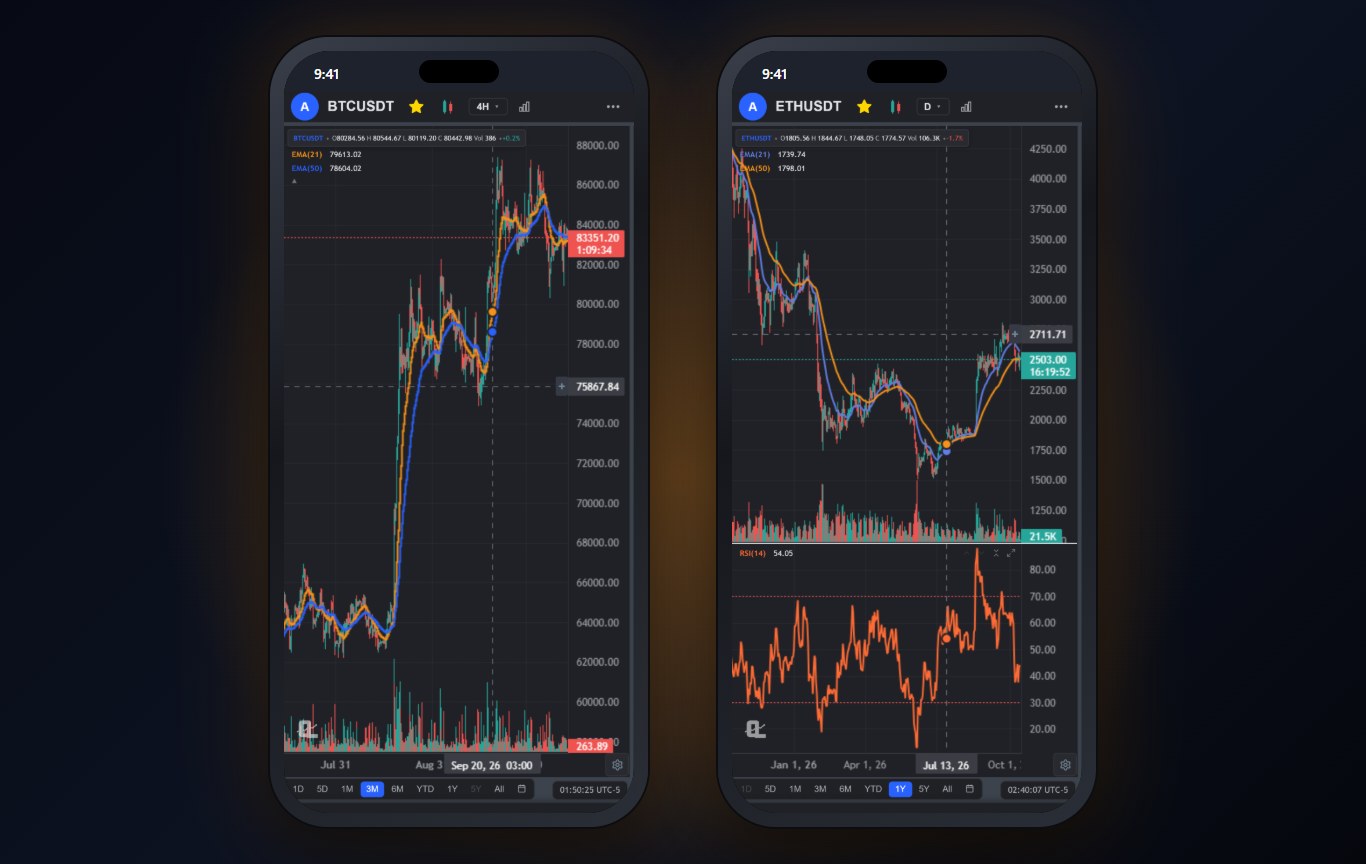
Crypto never closes, which means the chart app on your phone matters more for crypto than for anything else. The move happens at 2 AM on a Sunday. You are not at a desk.
Here is the problem with most crypto apps: they are exchanges or price trackers first. Exchanges give you a chart so you will trade. Trackers give you a price line so you will scroll. Neither is built for actual technical analysis. I tested six apps on a real crypto workflow: pull up Bitcoin, Ethereum and a smaller altcoin, draw levels, add indicators, set an alert. If you are using AI in your crypto process, AI-assisted crypto trading covers how to keep it honest.
What to Look For in a Crypto Chart App
- Real candlestick charts on every timeframe. Not a smoothed price line. One minute to weekly.
- Drawing tools. Trend lines, Fibonacci and horizontal levels are how most crypto traders read a chart. The Fibonacci retracement guide explains why crypto respects those levels so often.
- Indicators that work on 24/7 data. RSI, moving averages and VWAP behave differently when there is no market close.
- Alerts that wake you up. Push notifications you can trust overnight.
- Independence from the exchange. Your analysis should not live inside the place that holds your coins.
The 6 Best Crypto Chart Apps at a Glance
| App | Best for | Drawing tools | Price |
|---|---|---|---|
| ChartingLens | Technical analysis, alerts and AI on any coin | Full toolkit | Free, Premium $14.99/mo |
| TradingView | Crypto scripts and community ideas | Full toolkit | Free, paid $14.95 to $69.95/mo |
| Coinbase | Charts next to a US exchange account | Basic | Free app |
| Kraken | Advanced exchange charts | Good | Free app |
| CoinGecko | Free coverage of thousands of coins | None | Free |
| CoinMarketCap | Free market overview and rankings | None | Free |
The Best Crypto Chart Apps, Ranked
1ChartingLens: Best Crypto Chart App Overall
ChartingLens charts every Coinbase USD pair, from Bitcoin and Ethereum down to smaller altcoins, on every timeframe from one minute to monthly, alongside stocks and forex in the same app. The full drawing toolkit works by finger, and the large built-in indicator library treats crypto's 24/7 sessions properly.
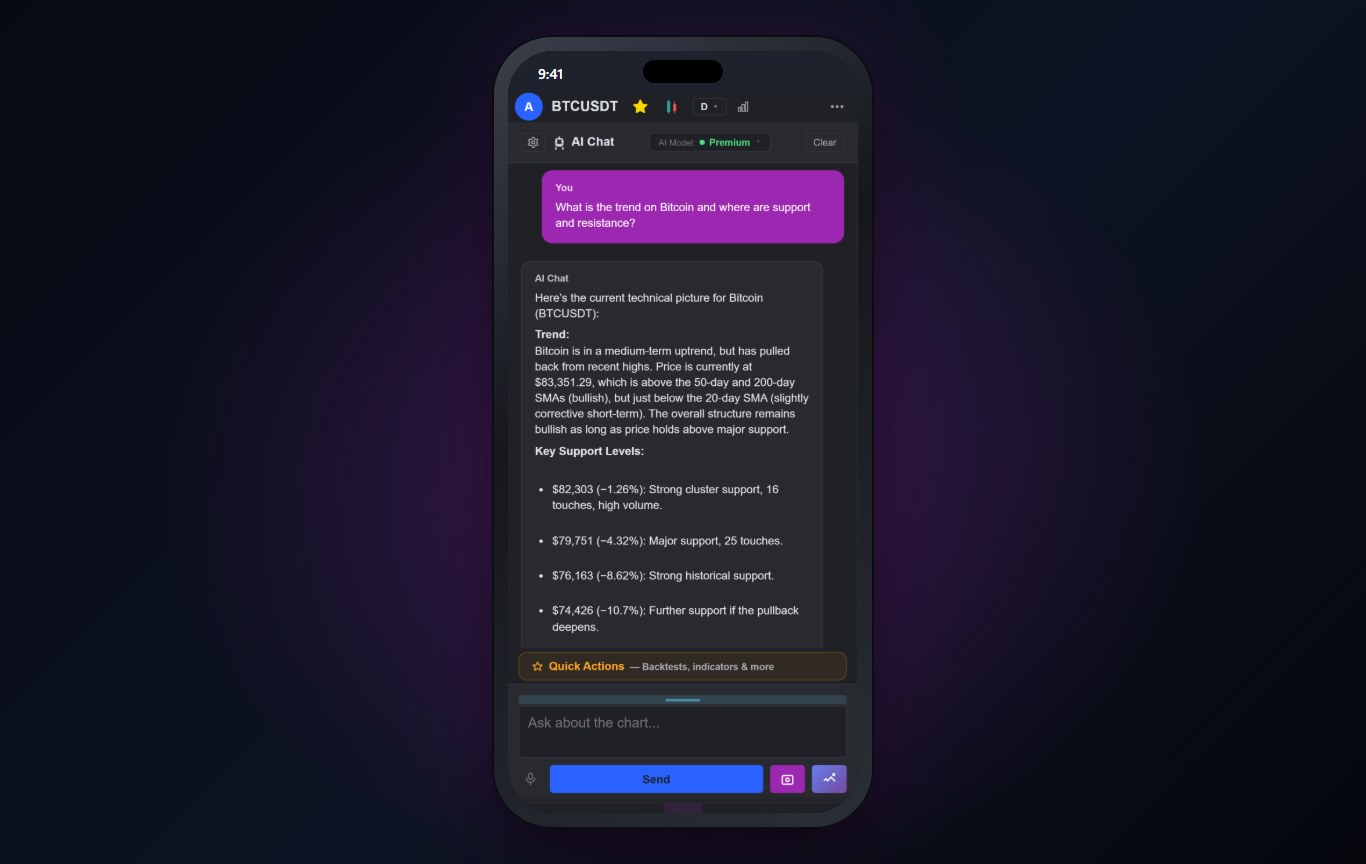
The AI assistant is where it gets useful at odd hours. Ask "what is the trend on Bitcoin and where is support" and it answers from the actual chart: trend structure, the support levels, how many times each was tested. The screenshot below is a real answer from October 14. On Premium you can also run your own indicator as a scan across every crypto pair, and get AI crypto buy signals.
It does not hold coins or execute trades. That is the point: your charts, drawings and alerts stay the same whichever exchange you use.
Best fit: crypto traders who want proper technical analysis on their phone, separate from their exchange.
2TradingView: Best for Crypto Scripts and Ideas
TradingView carries data from many exchanges and has an enormous library of crypto scripts and a busy ideas feed.
The free plan's limits bite fast once you want more than a couple of indicators or alerts, and the ideas feed is a mixed bag for crypto in particular.
Best fit: crypto traders who rely on community scripts.
3Coinbase: Best Charts Inside a US Exchange
If your coins are on Coinbase, its app's advanced trading view gives you real candlestick charts and a handful of indicators right next to your balance.
The charting is basic, and you can only chart what Coinbase lists. It is built to get you to trade.
Best fit: Coinbase users who want quick chart checks.
4Kraken: Best Advanced Exchange Charts
Kraken's pro app has the most capable charts of the exchange apps here, with more indicators and drawing than Coinbase.
It is still an exchange app, and its charts only cover Kraken's markets.
Best fit: active traders who keep their coins on Kraken.
5CoinGecko: Best Free Coverage of Thousands of Coins
CoinGecko tracks thousands of coins with price charts, market caps, volume and portfolio tracking, all free.
It is a tracker, not a chart app. No real drawing tools and only basic chart types.
Best fit: holders who want prices and portfolio tracking.
6CoinMarketCap: Best Free Market Overview
CoinMarketCap is the default place to check rankings, market cap and the overall crypto market, with simple price charts.
Like CoinGecko, it is not built for technical analysis.
Best fit: quick market checks.
A Simple Crypto Chart Setup That Works on a Phone
- Daily for direction, 4-hour for entries. Crypto's noise on the 5-minute chart will chew up a phone trader.
- Two moving averages. A 21 and a 50 EMA, like the Ethereum chart above, tell you trend and pullback zones at a glance.
- RSI for exhaustion. The RSI divergence guide shows the pattern that flags tired crypto rallies.
- Levels on the weekly highs and lows. Then alerts on each, so the app wakes you, not the other way round. The support and resistance guide covers where to put them.
Why We Built This Into ChartingLens
Crypto traders kept telling us they were juggling an exchange app, a tracker and a chart app at 2 AM. ChartingLens puts the charting and the alerts in one place, independent of wherever the coins live.
ChartingLens is a well-established platform with a large active user base, advanced features, and an institutional-grade strategy builder and backtesting engine. Describe a strategy in plain English and the institutional-grade backtesting engine tests it on years of history, with the trades marked on the chart. It is broker-agnostic, so it works with any brokerage and you keep the broker you already trust. The large built-in indicator library, the multi-asset coverage (stocks, ETFs, crypto, forex, metals and indices across US and international exchanges) and a mature AI-first feature ecosystem are the same on the phone as on the desktop. It is battle-tested at scale: the charts, alerts and AI run day to day for a large trader community spanning day traders, swing traders, crypto traders and long-term investors, and a lot of what ships comes straight from that community's feedback.
If you are new to any of it, the extensive documentation and learning resources help: the free Learn courses draw every example on a real chart, and the how to use ChartingLens guide walks through every panel.
The Bottom Line
ChartingLens is the best crypto chart app for most traders: real charts on every Coinbase USD pair, a full drawing toolkit, alerts and an AI assistant, all independent of your exchange. TradingView is the pick if you depend on community scripts, Coinbase and Kraken are fine for quick checks next to your account, and CoinGecko and CoinMarketCap are trackers rather than chart apps. For a stock-focused view of the same question, see the best stock chart app for iPhone.
Related Articles
AI-Assisted Crypto Trading
How to use AI on crypto charts without handing it the wheel.
Read article → AlternativesBest TradingView Alternatives
Every serious TradingView replacement compared side by side.
Read article → Technical AnalysisSupport and Resistance Levels
The levels most alerts should be sitting on.
Read article →Chart Crypto Properly From Your Phone
Every Coinbase USD pair, a full drawing toolkit, alerts and an AI assistant, free to start.
Start Charting Free →